
Views: 0 Author: Site Editor Publish Time: 2026-10-21 Origin: Site


A small workshop can gain production capacity without gaining extra floor space. That is the practical appeal of compact CNC router machines.
Manual cutting often brings layout errors, uneven details, and costly rework. A compact router turns a tested digital file into repeatable tool movement.
This guide explains how small shops can improve speed, consistency, material use, and job flexibility. It also covers machine selection, suitable materials, workflow, and safety.
Space is often the first limit inside a growing workshop. Every new machine competes against assembly benches, stock storage, packing areas, and safe walkways. Compact CNC router machines place automated cutting and engraving on a bench-sized platform. They can add digital production without forcing a complete shop redesign.
Compact does not mean useful capacity is guaranteed. The work envelope still controls which parts fit between the axes. Buyers should compare X, Y, and Z travel against their largest recurring products. A smaller machine works well when most orders involve plaques, panels, fixtures, prototypes, jewelry, or short sign components.
The best layout keeps stock, tools, and finished parts close to the router. Operators spend less time carrying material across the shop. Shorter handling routes also reduce bumps, scratches, and misplaced blanks. A stable bench, front access, and clear service space make daily setups easier.
Small-Shop Need | How a Compact CNC Router Helps |
Limited floor space | Adds CNC capacity on a bench or compact stand |
Mixed custom orders | Changes products through digital files and tooling |
Small production team | Runs programmed work while staff handle other tasks |
Quality variation | Repeats tested positions, depths, and toolpaths |
Outsourced detail work | Brings suitable engraving and light cutting in-house |
One machine may support many profitable items. A sign shop can cut acrylic letters, engrave wood plaques, and drill mounting patterns. A product studio can machine jigs, packaging inserts, and prototypes. This range helps fill production gaps between larger orders.
The Leading CNC Machine & CNC Spindle Motor Manufacturer - Zhonghuajiang Spindle website says Huajiang began manufacturing in 2000. It also reports a 20,000-square-foot facility and over 20 production lines. Its compact router range reflects a broader background in CNC machines, spindle motors, VFDs, and related parts.
Small shops still need realistic expectations. A desktop router cannot replace an industrial flatbed for full sheets or deep metal removal. Its strength comes from matching compact capacity to frequent, high-value work. That match keeps the machine busy without consuming space needed elsewhere.
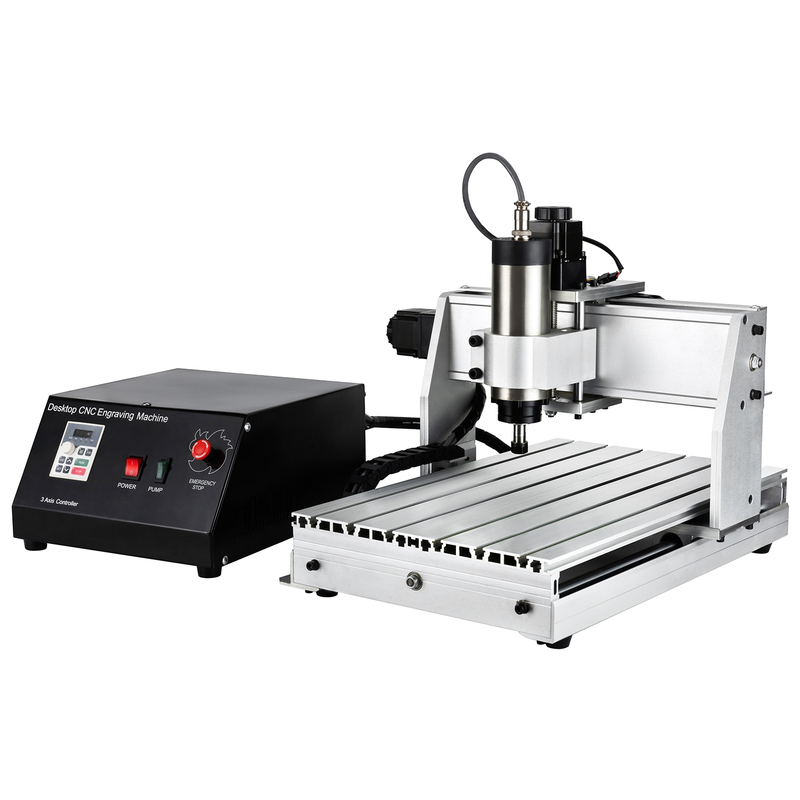
A compact router saves time by turning repeatable decisions into a reusable process. The operator creates or imports a design, prepares toolpaths, secures the stock, and sets the work origin. The controller then follows programmed movements instead of hand-drawn lines or physical templates.
Autodesk’s CNC programming overview explains how G-code controls movement, spindle speed, feed rate, and related actions. This digital workflow lets a shop test one program, correct it, and reuse it. Repeat orders no longer require a fresh manual layout.
Saved files keep dimensions, depths, and engraving positions consistent. They are especially useful for nameplates, product labels, fixtures, and matching components. A tested program also reduces variation between different operators. Consistency depends on calibration, sharp tools, firm workholding, and stable material.
Efficient toolpaths reduce unnecessary travel and repeated passes. Nesting places several parts on one blank while preserving safe spacing. The shop can produce more usable pieces from each sheet. It can also save offcuts for tests or smaller products.
Use this simple production sequence:
1. Standardize stock sizes and file names before programming.
2. Group jobs sharing one material, tool, and thickness.
3. Run a scrap test before loading valuable stock.
4. Inspect the first finished part before releasing the batch.
5. Record proven feeds, speeds, depths, and tool numbers.
Automation also changes how labor gets used. After a safe setup, the router handles controlled motion while the operator prepares files or finishes previous parts. The machine still needs supervision based on the material, process, and shop rules. However, it reduces continuous hand guidance during each cut.
Fast machining alone does not create an efficient shop. Setup time, inspection, cleanup, tool changes, and material handling all affect output. Small shops gain more by building repeatable job systems. A reliable ten-minute setup often matters more than an aggressive feed rate causing broken tools or rough edges.
Compact CNC router machines work best on materials matched to their rigidity, spindle, tooling, and chip control. Wood and engineered boards are common starting points. Acrylic, PVC, and other plastics also machine well when heat remains controlled. PCB work and light soft-metal machining need more conservative settings.
Material | Common Small-Shop Jobs | Important Setup Focus |
Wood and plywood | Signs, inlays, boxes, reliefs, fixtures | Grain direction, tear-out control, dust removal |
MDF | Letters, templates, molds, display parts | Sharp tools, dust extraction, sealed edges |
Acrylic | Displays, logos, panels, tags | Chip evacuation, suitable bits, controlled heat |
PCB material | Isolation paths, holes, prototypes | Flat spoilboard, fine tools, accurate Z-zero |
Aluminum or brass | Plates, engraving, light profiles | Rigid clamping, shallow passes, suitable lubrication |
Wood projects can combine profiling, pockets, drilling, and engraving within one setup. This reduces transfers between saws, drills, and handheld routers. It also keeps decorative details aligned with outside edges. Clean results still depend on the correct bit geometry and cutting direction.
Plastics need sharp tools and enough chip clearance. Excess heat can melt chips back onto the edge. Very slow feeds may rub instead of cut. Test cuts help the operator balance spindle speed, feed rate, and pass depth.
Soft metal requires more care than wood. A compact router may engrave brass or make shallow aluminum profiles. It should not be treated like a heavy milling center. Strong workholding, small step-downs, suitable carbide tools, and controlled heat protect the finish and spindle.
A Zhong Hua Jiang 3020 configuration lists a 210 × 300 × 60 mm work area. The site also lists ball-screw transmission and several spindle choices. Its 3040 compact desktop router expands the usable area for larger plaques, prototypes, and grouped parts. Published capacities still require the buyer to verify each configuration.
Profitable work usually comes from repetition or customization. Good examples include serialized plates, personalized gifts, small signs, drilling templates, electronic enclosures, and prototype components. The ideal job fits comfortably, uses proven tooling, and returns often enough to justify saved fixtures and programs.
Two compact routers can occupy similar space yet perform very differently. Productive capacity comes from the complete system, not a single headline specification. Buyers should begin with recurring parts, materials, and finish requirements. Those needs reveal which features deserve the budget.
The work envelope must hold the part, clamps, and cutting clearance. Z travel should cover the stock, spoilboard, and required tool length. Frame rigidity keeps the cutter stable under load. Flex can create chatter, inaccurate dimensions, rough edges, and shorter tool life.
Ball screws usually provide controlled motion and low backlash for detailed work. Other drive systems may offer different speed, cost, and maintenance tradeoffs. Buyers should ask how the machine maintains alignment and how backlash gets checked. Accessible adjustment points shorten service work.
Spindle power does not guarantee fast cutting. The frame, collet, bit, feed rate, and pass depth must support the load. Speed range matters because wood, plastic, and metal need different cutting conditions. Reliable collets and balanced tools also protect surface quality.
The controller should match the operator’s skills and planned workflow. GRBL systems suit many entry-level desktop machines. MACH3-based configurations may support other control preferences. Confirm computer requirements, file compatibility, offline control, limit switches, probing, and emergency-stop behavior before purchase.
Use this buying checklist:
Measure the largest repeating part, not the smallest sample.
List every material and required cutting depth.
Calculate space for the router, enclosure, vacuum hose, and computer.
Confirm available voltage, spindle configuration, collets, and replacement tools.
Review training, manuals, spare parts, warranty terms, and response times.
Ask whether future rotary work or a stronger spindle needs another machine.
The manufacturer says Zhong Hua Jiang supports OEM/ODM requests and customized configurations. That can help buyers align spindle, controller, and accessories with a defined process. A useful supplier discussion should include part drawings, materials, tolerances, batch sizes, working hours, and local power.
Avoid buying only for maximum advertised capability. A router producing clean daily work creates more value than an oversized specification used rarely. Stable setups, available support, and affordable consumables often decide long-term productivity.
Efficiency begins before the spindle starts. A well-prepared job arrives at the router with verified stock, named files, selected tools, and a clear inspection plan. This preparation prevents operators from solving the same problem during every production run.
Keep the drawing, CAM file, G-code, setup image, tool list, and material record together. Note the work origin and fixture position. Record proven feeds, spindle speeds, pass depths, and finishing allowances. Version control prevents an old toolpath from reaching new stock.
Start each batch with a first-article check. Measure important dimensions and inspect edge quality before continuing. If the result fails, stop and correct the setup. This small pause costs less than scrapping an entire sheet or remaking several engraved products.
Record setup minutes, cutting time, tool changes, rejected parts, and maintenance stops. These numbers reveal the real bottleneck. A faster bit cannot solve slow clamping. A larger spindle cannot fix repeated programming errors.
Useful weekly actions include:
Clean rails, screws, collets, fans, and accessible chip areas.
Check fasteners, cable movement, lubrication needs, and emergency controls.
Inspect bits for wear, buildup, chips, or incorrect tool numbers.
Surface the spoilboard when flatness starts affecting depth.
Back up proven programs and keep revisions clearly labeled.
Compact size does not remove machine hazards. Fine wood dust affects health and can create fire risks. OSHA’s wood-dust guidance recommends engineering controls, including local exhaust ventilation. Shops should use suitable extraction, guarding, hearing protection, and eye protection for their processes.
Keep the emergency stop reachable from the normal operating position. Never reach near a moving tool. Secure every blank and inspect clamps before running. Avoid leaving unfamiliar or risky jobs unattended. An enclosure can help contain chips and noise, but it must allow safe airflow and maintenance.
Finally, review machine utilization monthly. If waiting comes from programming, improve templates and training. If setup causes delays, improve fixtures and stock standards. If capacity stays full, move recurring work onto scheduled batches. Measured improvements turn a compact router into a dependable production asset.
Compact CNC router machines help small shops produce accurate, repeatable work within limited space. Their value comes from suitable jobs, proven programs, firm workholding, correct tooling, and disciplined maintenance.
Choose the work envelope, spindle, controller, and support around real products. When the machine matches the workflow, it can reduce rework, shorten setups, and expand profitable cutting and engraving services.
A: They can support commercial small-part work when the machine and process meet the required tolerance. Rigidity, calibration, tool condition, workholding, and material stability all affect accuracy. Always test a sample, measure critical features, and approve the first part before batch production. Do not assume one published accuracy applies to every material or configuration.
A: Common materials include wood, plywood, MDF, acrylic, PVC, plastics, PCB material, and selected soft metals. Actual capacity depends on spindle power, frame rigidity, tooling, cooling, and cutting parameters. Soft metals usually need shallow passes and rigid clamping. Compact routers are not substitutes for heavy metal milling centers.
A: Allow more space than the machine’s outside dimensions. The shop needs room for a stable bench, stock loading, clamps, computer access, extraction hoses, ventilation, and maintenance. Include clearance for long workpieces when using tiling. Keep walkways open and emergency controls easy to reach.
A: Yes, especially for small repeated parts, serialized plates, signs, gifts, fixtures, and prototypes. Batch efficiency improves through saved programs, standardized stock, nesting, and repeatable fixtures. Inspect the first item before running the batch. Track tool wear because it can change dimensions and finish quality over time.
A: Start with the largest recurring part and hardest planned material. Select enough X, Y, and Z travel for stock, clamps, and tools. Match spindle power and speed to realistic cutting loads. Choose a controller compatible with available computers, software, and operator skills. Confirm probing, limit switches, emergency stops, support, and replacement parts before ordering.


