You are here:Home » News » How To Choose A Desktop CNC Router Manufacturer for Small Workshop Production
How To Choose A Desktop CNC Router Manufacturer for Small Workshop Production
Views: 0 Author: Site Editor Publish Time: 2026-09-18 Origin: Site
Choosing the wrong CNC router can turn small orders into costly delays.
For a small workshop, every failed cut hurts profit.
A reliable Desktop CNC Router Manufacturer affects more than machine price.
It shapes uptime, cutting accuracy, setup speed, maintenance cost, and long-term production stability.
In this post, you’ll learn how to compare machine rigidity, spindle matching, software support, and after-sales service.
We’ll also show how Zhong Hua Jiang supports small workshops, maker studios, and light production users with CNC routers, spindle motors, and VFD inverters.
Check Machine Structure, Rigidity, and Motion Accuracy First
Machine rigidity should be your first checkpoint when choosing a Desktop CNC Router Manufacturer. A weak machine may still move, cut, and finish a job, but it will not repeat the same result for long. In a small workshop, repeatability matters more than flashy specifications because every bad part costs material, labor, and delivery time.
Think of the machine frame as the backbone. If it flexes during cutting, the spindle cannot stay steady. Then the cutter starts to vibrate, the edge becomes rough, and the finished part may not match the drawing. For wood signs, this means fuzzy letters. For acrylic, it may leave chipped edges. For soft aluminum or brass, it may cause chatter marks and poor hole accuracy.
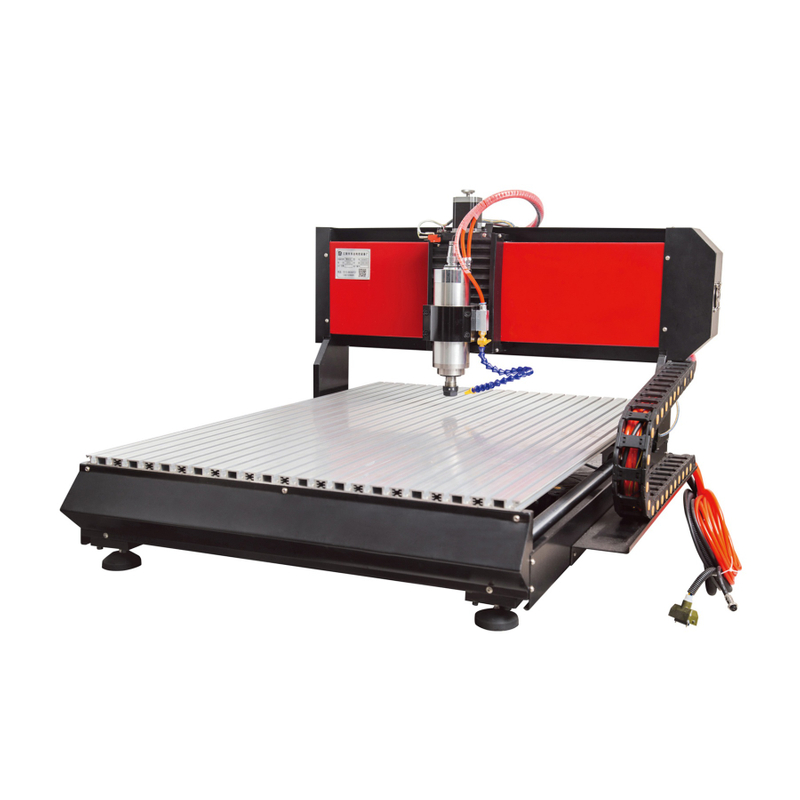
A reliable desktop CNC router should use stronger frame materials and a stable motion system. Thickened aluminum alloy works well for many small workshops because it balances weight, rigidity, and cost. A solid steel frame is better for larger desktop machines, especially when the workpiece is bigger or the cutting load is heavier. Zhong Hua Jiang’s 3020 model uses ball screw transmission and a thickened aluminum alloy frame, while its 6090 steel structure router is built for stronger stability in higher-output workshops.
Structure Area
Better Choice
Why It Matters in Small Workshops
Frame material
Thick aluminum alloy or solid steel
It reduces flex during repeated cutting jobs. It also helps the machine stay accurate over time.
Motion guide
Stable guide rails or linear profile rails
They support smoother axis travel. They also reduce shaking during deeper passes.
Drive system
Ball screws on key axes
They improve positioning accuracy. They also hold up better during small-batch work.
Weak alternative
Thin frames, poor rails, belt drives
These parts may save money first. They often increase rework, noise, and downtime later.
Why Does Machine Rigidity Matter for Small Workshop Production?
Small workshops often run mixed jobs. One day may involve acrylic signs. The next may include MDF panels, PCB prototypes, or small brass parts. The machine does not need to be huge, but it must stay stable across these daily changes.
Rigidity helps the cutter follow the programmed path. It keeps the spindle from shaking under load. It also reduces tiny errors, which become visible after repeated passes. This is why a stronger structure can improve engraving detail, surface finish, and part consistency.
Here is the practical test I would use before buying:
Ask the manufacturer what frame material is used. Do not accept vague answers like “metal frame” or “strong body.” Request clear material details, frame thickness, and real machine photos. A good supplier should explain why the structure fits wood, acrylic, PCB, or light metal work.
Check whether the machine is designed for repeated small-batch production. A hobby frame may handle light engraving, but it may struggle under daily orders. If you plan to cut MDF, aluminum fixtures, or thicker acrylic, ask for a stronger desktop model.
Compare finished sample quality, not only machine size. Clean edges, smooth engraving, and repeatable dimensions show better rigidity. If two machines look similar, the more stable one usually wins in real workshop use.
What Motion System Should Buyers Look For?
The motion system decides how smoothly each axis moves. Even a strong frame can produce poor results if the rails, screws, and axis assembly are weak. For small workshop production, look for ball screws, stable guide rails, accurate positioning, and firm axis support.
Ball screws are a strong choice for repeated CNC work. They help the machine move more precisely than many belt systems. They also reduce backlash, which helps when cutting letters, holes, pockets, and fine details. Zhong Hua Jiang’s 3020 desktop CNC router uses ball screw transmission, which fits standard small workshop production better than basic entry-level motion designs.
Stable guide rails also matter. Poor rails can create uneven movement, especially when the spindle changes direction. That may lead to stepped edges, rough curves, and inconsistent depth. If the machine uses better rail support, the axis movement feels smoother and more controlled.
Before ordering from any Desktop CNC Router Manufacturer, ask these questions:
Does the machine use ball screws, lead screws, or belts?
What type of guide rails support each axis?
Is the frame strong enough for daily small-batch production?
Can the supplier match the structure to your real materials?
Are there test videos showing wood, acrylic, PCB, or soft metal cutting?
A small shop does not need the most expensive CNC router. It needs a machine built for real work. Start by checking structure, rigidity, and motion accuracy, then compare spindle power and software support.
Compare Spindle, Motor, and VFD Integration
A good Desktop CNC Router Manufacturer should not only sell you a machine frame. It should help you match the spindle, drive motor, and VFD as one working system. This matters because small workshops often have limited time for testing, rewiring, or fixing unstable speed settings after delivery.
The spindle decides how the cutter meets the material. The motor system decides how smoothly each axis moves. The VFD controls spindle speed, torque output, and operating protection. If these parts come from different sources, the machine may still run, but it may not run well under daily production.
Zhong Hua Jiang is useful here because it makes CNC router machines, CNC spindle motors, and VFD inverters under one supply system. Its desktop CNC routers can be matched to different spindle powers, from light-duty units to higher-power square spindles. This helps small shops choose based on real materials, not guesswork.
Component
What to Check
Why It Matters
Spindle
Power, cooling type, chuck size, RPM range
It affects cutting depth, material range, and surface quality.
Drive motor
Stepper, closed-loop stepper, or hybrid servo
It affects motion stability and lost-step risk.
VFD inverter
Power match, speed range, protection settings
It keeps spindle speed safer and more stable.
Tool change
MTC or ATC spindle option
It affects labor time during repeated jobs.
Spindle power should match the material, workload, cutting depth, and daily runtime. A small 3018 router may fit PCB, foam, leather, wax, or light engraving. A 3020 or 3040 machine may need stronger spindle options for wood, MDF, acrylic, brass, or soft aluminum. A larger 6090 steel structure router may require higher-power square spindles for heavier daily output.
Should Small Workshops Choose Air-Cooled or Water-Cooled Spindles?
Air-cooled spindles are often easier for small workshops. They do not need water pumps, tanks, tubes, or regular coolant checks. This keeps maintenance simple, especially for garages, maker studios, and small teams.
They also fit compact spaces better. Zhong Hua Jiang’s air cooling spindle series is one of its key product lines, and it suits users who want fewer support parts around the machine. For many shops cutting wood, acrylic, MDF, and light metals, this is a practical choice.
Water-cooled spindles still have value. They are usually quieter and better for long continuous runs. If your shop runs the same job for many hours, noise and heat control may matter more than simple maintenance.
Why Is VFD Matching Important?
The VFD is easy to ignore until it causes trouble. A poor match can create unstable speed, weak torque, error alarms, heat, or wiring confusion. It may also make a good spindle feel worse than it really is.
A matched VFD supports smoother speed control and safer operation. It helps the spindle hold the right RPM during cutting. It also supports overload protection, cleaner wiring, and easier setup for new operators.
When speaking to a manufacturer, ask for clear VFD parameters. Ask whether the VFD is tested before shipment. Also ask whether the supplier can guide speed settings for wood, acrylic, PCB, brass, or soft aluminum.
When Should Buyers Consider MTC or ATC Spindles?
Manual Tool Change, or MTC, is enough for many small workshops. It keeps the machine cost lower and works well for simple jobs. If most orders use one or two tools, MTC is usually a smart starting point.
Automatic Tool Change, or ATC, becomes useful when tool changes slow production. It helps when one part needs engraving, drilling, pocketing, and cutting in one workflow. The upfront cost is higher, but it can save labor during repeated batches.
Before choosing, count your real tool changes per job. If the operator changes tools all day, ATC may pay back faster. If most work is simple engraving or cutting, MTC keeps the setup lean and affordable.
Match Desktop CNC Router Models to Workshop Size and Production Goals
A smart Desktop CNC Router Manufacturer should help buyers choose by real workshop needs, not just machine photos. Start by checking four things: available space, material size, daily order volume, and future growth. A small machine may fit today, but it can limit tomorrow’s jobs.
For example, a home workshop making PCB samples needs a different router than a shop cutting acrylic signs every day. A maker studio may care about compact size and easy setup. A growing workshop may need stronger structure, higher spindle power, and room for larger workpieces.
1610 Desktop CNC Router for Beginners and Tiny Workshops
The 1610 desktop CNC router fits users who need a low-risk starting point. It works well for small engraving orders, simple prototypes, and learning CNC workflow. It is also easier to place in student labs, home workshops, and compact workbenches.
This model can process wood, acrylic, PCB, plastic, brass, and soft aluminum when used within proper cutting limits. It is not built for heavy removal, but it gives new users a practical way to test products, materials, and customer ideas. For small custom engraving orders, that flexibility matters.
3018 Desktop CNC Router for Light Engraving and PCB Prototyping
The 3018 desktop CNC router is a good match for light-duty work. It usually appeals to buyers who want a compact footprint, simple setup, and lower entry cost. Its ER11 chuck also supports common small tools used in engraving and prototype work.
This model is useful for PCB prototyping, small crafts, foam, leather, wax, and light engraving. It is not the right choice for thick metal cutting, but it can handle many mini workshop tasks. If your jobs are small and detailed, it can be a practical first machine.
3020 and 3040 Desktop CNC Routers for Standard Small Workshop Production
The 3020 and 3040 models make more sense when orders become regular. They offer more working space and stronger production value than smaller entry machines. For many small shops, this is where desktop CNC work starts to feel stable.
A 3020 desktop CNC router can include ball screw transmission, MACH3 support, and spindle options such as 300W, 800W, or 1.5KW. These choices help buyers match the machine to wood signs, custom wooden gifts, acrylic parts, and small aluminum or brass components. The 3040 adds a larger working area, which helps when jobs outgrow the smaller frame.
When choosing between them, ask these questions:
Do most orders fit within a 3020 work area? If yes, it may control cost better. If orders keep getting larger, the 3040 gives more room and fewer layout limits.
Will the machine run daily? If yes, ask about spindle power, rail support, and ball screw quality. They affect repeatability, surface finish, and failed-part risk.
Do you need software support? MACH3 compatibility and clear setup help reduce training time. This matters when one operator handles design, cutting, and finishing.
6090 Steel Structure Desktop CNC Router for Higher Output Workshops
The 6090 steel structure desktop CNC router suits workshops ready for larger parts. It offers stronger stability for acrylic signs, larger wooden panels, furniture accessories, and aluminum fixtures. It also gives buyers more room to accept bigger custom orders.
This model can be paired with higher-power square spindles, including options from 1.5KW to 7.5KW. That makes it more suitable for heavier workloads and longer daily production. If your shop plans to expand, this type of machine leaves more room for future growth.
Before ordering a 6090, check floor space, power supply, material handling, and shipping access. Larger machines can increase output, but they also need better planning. A reliable manufacturer should help you confirm spindle power, controller options, packaging, and setup support before production starts.
Conclusion
Choosing a Desktop CNC Router Manufacturer should start with your real production needs.
Check machine rigidity, spindle and VFD matching, software support, model size, and customization options.
Also review factory qualifications, warranty terms, spare parts, and technical support.
Join us as an exclusive distributor of CNC Router Machines and CNC Spindle Motors. As a professional manufacturer, we provide high-performance machines, attractive profit margins, technical training, and full marketing support. Build a strong partnership with us and expand your market with confidence.


 English
 简体中文
简体中文 繁體中文
繁體中文 العربية
 Français
 Русский
 Español
 Português
 Deutsch
 italiano
 日本語
日本語 한국어
한국어 Nederlands
 Tiếng Việt
 ไทย
ไทย Polski
 Türkçe
 አማርኛ
አማርኛ ພາສາລາວ
 ភាសាខ្មែរ
 Bahasa Melayu
 ဗမာစာ
ဗမာစာ தமிழ்
தமிழ் Filipino
 Bahasa Indonesia
 magyar
 Română
 Čeština
 Монгол
 қазақ
қазақ Српски
 हिन्दी
 فارسی
فارسی Kiswahili
 Slovenčina
 Slovenščina
 Norsk
Norsk Svenska
 українська
 Ελληνικά
 Suomi
Suomi Հայերեն
 עברית
עברית Latine
 Dansk
Dansk اردو
اردو Shqip
Shqip বাংলা
বাংলা Hrvatski
 Afrikaans
 Gaeilge
 Eesti keel
 Māori
Māori සිංහල
සිංහල नेपाली
 Oʻzbekcha
 latviešu
 অসমীয়া
 Aymara
 Azərbaycan dili
 Bamanankan
 Euskara
 Беларуская мова
 भोजपुरी
 Bosanski
 Български
 Català
 Cebuano
 Corsu
Corsu ދިވެހި
 डोग्रिड ने दी
 Esperanto
 Eʋegbe
 Frysk
Frysk Galego
 ქართული
 guarani
 ગુજરાતી
 Kreyòl ayisyen
 Hausa
Hausa ʻŌlelo Hawaiʻi
 Hmoob
Hmoob íslenska
 Igbo
Igbo Ilocano
 Basa Jawa
 ಕನ್ನಡ
ಕನ್ನಡ Kinyarwanda
 गोंगेन हें नांव
 Krio we dɛn kɔl Krio
 Kurdî
Kurdî Kurdî
Kurdî Кыргызча
 Lingala
 Lietuvių
 Oluganda
 Lëtzebuergesch
 Македонски
 मैथिली
 Malagasy
 മലയാളം
 Malti
Malti मराठी
मराठी ꯃꯦꯇꯥꯏ (ꯃꯅꯤꯄꯨꯔꯤ) ꯴.
 Mizo tawng
 Chichewa
 ଓଡ଼ିଆ
ଓଡ଼ିଆ Afaan Oromoo
 پښتو
پښتو ਪੰਜਾਬੀ
 Runasimi
 Gagana Samoa
 संस्कृत
 Gaelo Albannach
 Sepeti
 Sesotho
 chiShona
 سنڌي
سنڌي Soomaali
 Basa Sunda
 Wikang Tagalog
 Тоҷикӣ
 Татарча
 తెలుగు
 ትግንያውያን
 Xitsonga
 Türkmençe
 संस्कृत
 ئۇيغۇرچە
 Cymraeg
 isiXhosa
 ייִדיש
 Yorùbá
 isiZulu