You are here:Home » News » Mini CNC Router Machine for Small Business, Custom Products And Batch Production
Mini CNC Router Machine for Small Business, Custom Products And Batch Production
Views: 0 Author: Site Editor Publish Time: 2026-08-15 Origin: Site
Running a small shop is tough. One wrong cut can waste hours and materials. A Mini CNC Router Machine helps you stay consistent and profitable.
Choosing the right machine changes everything. You need the power, rigidity, and control that fit custom products and batch production.
In this post, you’ll learn what to check before buying. You’ll also see how to set up jobs to reduce scrap and repeat results fast.
Search Intent Fit: Choosing the Right Mini CNC Router Machine (Instead of Buying the Wrong One)
You didn’t search for a machine. You searched for results. A Mini CNC Router Machine can deliver clean custom work, but only if you match it to your real output: custom prototypes today, small-batch orders tomorrow.
If you buy based only on price, it usually shows up later as ruined parts, slower setups, and more rework. The trick is aligning your goal, your materials, and your shop workflow before you click “add to cart.”
Your real goal: custom prototypes vs small-batch production
Start by naming the job type. Prototype runs reward speed to first output. Batch runs reward consistency when the same file runs for hours.
For one-off custom products, your main worry is reducing the “learning tax.” You want predictable motion, stable basics, and a control system that your team can use quickly.
You’ll care about smooth engraving depth and clean edges.
You’ll benefit from simple setup and fewer calibration surprises.
You still need reliability, because even prototypes become urgent jobs.
A common pattern: a shop begins with small custom gifts, then upgrades because customers ask for “the same thing, but again.”
Reject rate affects profit more than cutting speed.
Throughput planning beats guessing: setup time becomes a cost.
Think of batch work like this: every minute spent remeasuring or reclamping steals margin. Every wobble or backlash issue shows up as inconsistent parts.
Job type
What you optimize first
What often breaks first
One-off custom
Fast onboarding, stable engraving
Setup confusion and calibration drift
Small-batch production
Repeatability, low rejects, throughput
Rigidity limits and inconsistent control workflow
Your materials determine your Mini CNC Router Machine specs
Materials are the hidden spec sheet. They decide spindle choices, rigidity needs, and even the control settings you’ll trust.
Wood, MDF
Wood and MDF are common starter materials. They also reveal whether your machine holds shape while you run longer jobs.
MDF rewards stable feed rates and sharp tooling.
MDF can fuzz if your setup is weak.
Wood responds well, but tool quality still matters for clean signs.
Acrylic, PVC
Acrylic and PVC can cut beautifully or look rough fast. Heat control becomes part of the process, not an afterthought.
You’ll want predictable motion so edges stay clean.
Plastic often needs careful bit selection and conservative parameters.
Consistency matters when you repeat multiple orders.
PCB blanks (engraving)
PCB work is less about removing lots of material. It’s more about accuracy and consistent depth paths.
You’ll notice runout and depth variation quickly.
Clean engraving improves downstream assembly.
Small errors compound when you batch many boards.
Soft metals: aluminum, brass, copper
Soft metals are where buyers learn the difference between “hobby capable” and “business stable.” A Mini CNC Router Machine that handles soft metals well needs real rigidity and enough spindle capability.
Aluminum cuts faster when the setup stays stiff.
Brass and copper demand stable motion and proper tooling.
Some shops use water-cooled spindles when they push output.
Material group
Typical shop priority
Common failure symptom
Wood/MDF
Stable feed, clean edges
Rough surfaces, inconsistent depth
Acrylic/PVC
Heat control and edge finish
Melting, chipping, messy engraving
PCB
Accuracy and repeatable depth
Inconsistent traces, uneven cuts
Aluminum/Brass/Copper
Rigidity + spindle stability
Flex marks, chatter, frequent tool issues
Your workflow determines your control system needs
Your control system is how the machine “fits” your team. It’s not just software. It shapes daily speed, training time, and batch handling.
Online PC control vs offline/U-disk style workflows
Online PC control works great when someone owns the computer time. Offline workflows shine when you want the operator to run jobs without babysitting a PC.
Online setups can move fast for prototypes.
Offline/U-disk style runs reduce interruptions during batches.
Offline control often feels smoother when staff rotate shifts.
Multi-tool jobs and operator training considerations
Multi-tool jobs show the difference between “it cuts” and “it runs production.” Tool changes add steps, and steps add opportunities for mistakes.
Training matters more when multiple tools are involved.
Tool length and offsets must be repeatable.
A batch schedule needs fewer handoffs between operators.
In practice, a Mini CNC Router Machine wins when the workflow matches your reality: what operators know today, what tools you’ll use tomorrow, and how quickly you need each order to finish.
Selection Guide (Most Important): What to Check Before Buying a Mini CNC Router Machine
Most people shop for specs like they’re shopping for sneakers. But a Mini CNC Router Machine is closer to an investment in repeatable output. If the spindle, frame, drives, and control don’t match your batch needs, the machine will still “work”… just not profitably.
Before you compare brands, run a quick checklist. It saves days of returns and weeks of downtime when an order is due.
1) Spindle power & spindle type (brushless vs lower-power setups)
Spindle choice decides how fast you can cut, how clean edges look, and how often you need new bits. It also changes your workflow. A machine that cuts slowly forces you into more tool changes and longer job queues.
From a business angle, use these target ranges as guardrails for a Mini CNC Router Machine:
Brushless spindle
300W–500W minimum
800W+ ideal Brushless spindles typically run quieter, last longer, and hold stable cutting behavior during longer batches.
Spindle spec to check
Why it matters in real jobs
What you’ll notice first
Brushless spindle
Stable, less maintenance
Quieter shop, fewer failures
300W–500W+ power
Holds feed rates without strain
Faster throughput
800W+ target
Better headroom on thicker cuts
Less chatter in batches
In practice, “enough power” means fewer stalls and fewer re-cuts when the operator runs Job 7 right after Job 6.
Runout is how much the spindle tool deviates while spinning. You can’t always feel it by hand, but you can see it on production parts. When runout is high, edges get rough, tool wear speeds up, and dimensions drift across runs.
For batch buyers, this becomes a quality control signal, not a technical trivia point. One source-quality indicator is: runout controlled below 0.005mm. That’s the kind of target you want to hear during supplier discussions, because it supports consistent surface finish and dimensional accuracy.
If you’re running custom products, small inconsistency shows up as:
Different engraving depth across parts
Uneven corners on logos
More rework after customers approve the first sample
The trick is simple: batch success depends on repeatability, not a single “perfect” demo cut.
3) Rigidity, drives, and repeat accuracy (the stuff that stops rejects)
Rigid machines cut more consistently, especially for longer runs. Flexy frames act like a moving reference point. As the tool loads up, the part shifts a tiny bit, and that tiny bit becomes a reject after you repeat it 50 times.
For batch machining, prefer:
Cast aluminum / reinforced aluminum
Heavy-duty extrusion or solid steel framing Avoid:
Plastic or thin aluminum plate frames They may look fine in photos. They usually disappoint once you push steady production.
Next, the drive system controls backlash. With lead screws, backlash can creep into your output. With ball screws, friction drops and backlash reduces. That helps your “1st part vs 100th part” accuracy stay closer.
Finally, focus on repeat positioning accuracy for custom products:
Your machine should place the work reliably every time.
That reduces “setup drift,” which causes rework and scrap.
It also lowers your stress level when two operators run the same batch.
A practical rule: if your shop hates measuring and re-clamping, your drives and repeat accuracy will quietly pay you back.
4) Work area sizing & control system fit your team
Work area size is less about “more is better” and more about how often you must trim stock. Many mini routers land around ~300×400mm up to ~600×600mm. If your typical material sheets sit near that range, prep time drops.
A good business rule:
choose a bed that matches frequent sheet sizes
reduce extra cutting and extra handling
Control system matters just as much as hardware. It shapes training time and daily stability. Your team’s comfort level can be the difference between “we ship weekly” and “we delay orders.”
Use this mapping:
GRBL for entry models
Mach3 for mainstream mid-range machines
Offline handheld / DSP or U-disk options for high convenience
In busy workshops, offline options help when staff rotate shifts or when the computer becomes a bottleneck. A Mini CNC Router Machine should fit your routine, not force you to rebuild it.
Product Line Fit: Mini CNC Router Machine Categories That Match Small-Business Needs
A Mini CNC Router Machine isn’t one-size-fits-all. The category you pick decides how fast you can start, how consistent your output stays, and whether batch jobs feel calm or chaotic.
Most shops buy too small and then hate redoing setups. Others buy too big and feel stuck waiting for the “right project” to justify it.
Entry compact models are about getting to your first sellable parts quickly. They’re ideal when your work is small, thin, and detail-focused, not deep cuts or long continuous production.
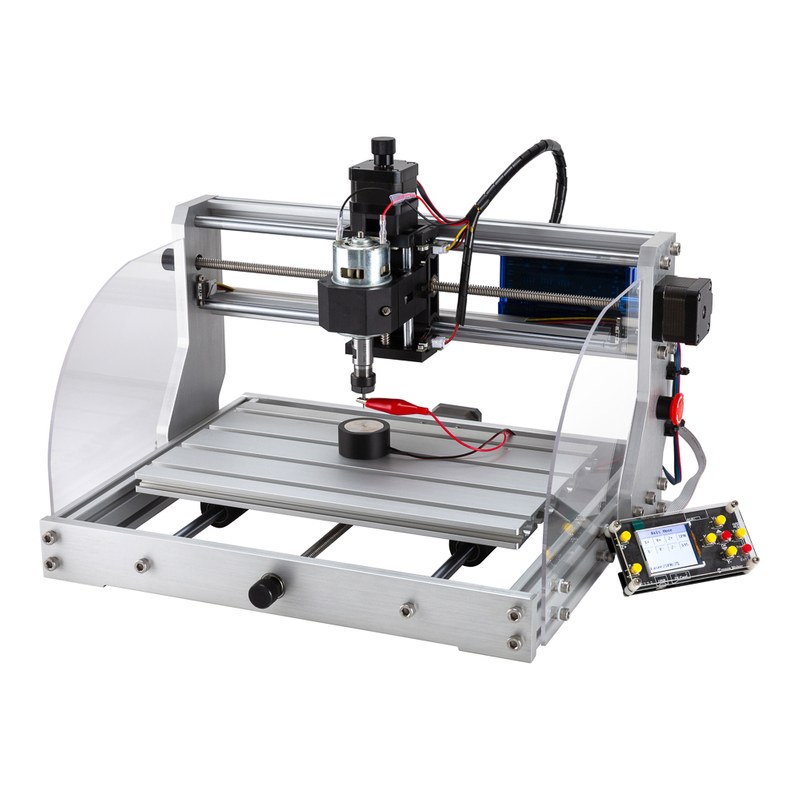
From the source lineup, these categories show up as 1610 and 3018-PROVer.
Best for: tiny custom engraving on thin wood, PVC, PCB blanks, small acrylic ornaments
Typical business use: sample production, low-startup hobby-to-business transition
You’ll feel the benefit in quoting, because sample turnaround becomes predictable
A quick reality check: if your orders are mostly logos, names, and small decorative pieces, entry class often wins on speed-to-start.
Mid-range standard Mini CNC Router Machine (mainstream custom & small batch)
Mid-range machines are where small businesses move from “making” to “delivering.” You cut more often, repeat more orders, and you care about consistency beyond one perfect demo.
A key quality signal from your source: stable dimensional precision target ±0.03mm
That matters because batch work punishes tiny errors across multiple parts
When customers want “the same logo again,” dimensional repeatability turns into margin protection.
Large desktop Mini CNC Router Machine (medium-volume batch + complex custom parts)
Large desktop models fit when your shop has real throughput goals. They support bigger workpieces, heavier setups, and longer repeating jobs without constant babysitting.
From your source, the categories are 6040 and 6090.
Best for: deeper milling of soft metals, batch furniture accessories, larger acrylic custom signs
Business outcomes: fewer machine stops and better throughput for repeated jobs
Larger frames also help reduce flex during heavier cuts, so the output stays closer to the first part
If your business is starting to book orders weeks ahead, this is where the “production mindset” shows up in the machine choice.
Category-to-fit overview (how to pick fast)
Use this table like a map. It matches category to your daily job type, so you don’t waste time comparing irrelevant specs.
Mini CNC Router Machine category
Typical size of work
What it’s best at
Entry compact (1610 / 3018-PROVer)
Small and thin parts
Fast samples, small engravings, light custom crafts
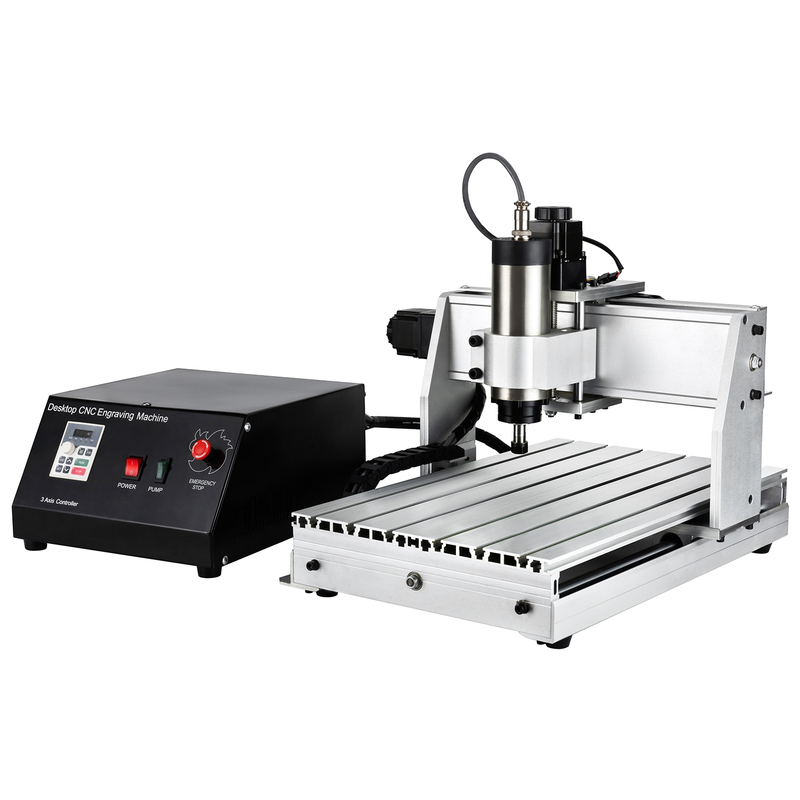
Mid-range standard (3020 / 3040)
Daily custom + small batches
Consistent custom output, mainstream sign/plaque work
The simplest rule is this: choose the smallest category that matches your repeat volume. It keeps your Mini CNC Router Machine busy while your team learns stable production habits.
FAQs About Mini CNC Router Machine
Q: What is the best Mini CNC Router Machine size for a small business?
A: Choose based on common stock sizes; mini often fits ~300×400mm up to ~600×600mm.
Q: Can a Mini CNC Router Machine cut aluminum and brass?
A: Yes—especially on rigid, higher-power setups; it supports soft metals like aluminum and brass.
Q: What spindle power do I need for batch production?
A: Prefer a brushless spindle; target at least 300W–500W, ideally 800W+.
Q: Do I need ball screws for custom products repeatability?
A: For batch consistency, yes—ball screws reduce backlash and help parts match.
Q: Which control system is easier for beginners in a workshop?
A: GRBL for entry models, while Mach3 fits many mainstream mid-range setups.
Q: How do I reduce setup time for batch runs?
A: Use dedicated jigs/fixtures and optimize workflow to minimize re-measuring and re-clamping.
Q: What CAM software helps with nesting and batching?
A: VCarve Pro and Fusion 360 support nesting to reduce waste and batch multiple parts.
Join us as an exclusive distributor of CNC Router Machines and CNC Spindle Motors. As a professional manufacturer, we provide high-performance machines, attractive profit margins, technical training, and full marketing support. Build a strong partnership with us and expand your market with confidence.


 English
 简体中文
简体中文 繁體中文
繁體中文 العربية
 Français
 Русский
 Español
 Português
 Deutsch
 italiano
 日本語
日本語 한국어
한국어 Nederlands
 Tiếng Việt
 ไทย
ไทย Polski
 Türkçe
 አማርኛ
አማርኛ ພາສາລາວ
 ភាសាខ្មែរ
 Bahasa Melayu
 ဗမာစာ
ဗမာစာ தமிழ்
தமிழ் Filipino
 Bahasa Indonesia
 magyar
 Română
 Čeština
 Монгол
 қазақ
қазақ Српски
 हिन्दी
 فارسی
فارسی Kiswahili
 Slovenčina
 Slovenščina
 Norsk
Norsk Svenska
 українська
 Ελληνικά
 Suomi
Suomi Հայերեն
 עברית
עברית Latine
 Dansk
Dansk اردو
اردو Shqip
Shqip বাংলা
বাংলা Hrvatski
 Afrikaans
 Gaeilge
 Eesti keel
 Māori
Māori සිංහල
සිංහල नेपाली
 Oʻzbekcha
 latviešu
 অসমীয়া
 Aymara
 Azərbaycan dili
 Bamanankan
 Euskara
 Беларуская мова
 भोजपुरी
 Bosanski
 Български
 Català
 Cebuano
 Corsu
Corsu ދިވެހި
 डोग्रिड ने दी
 Esperanto
 Eʋegbe
 Frysk
Frysk Galego
 ქართული
 guarani
 ગુજરાતી
 Kreyòl ayisyen
 Hausa
Hausa ʻŌlelo Hawaiʻi
 Hmoob
Hmoob íslenska
 Igbo
Igbo Ilocano
 Basa Jawa
 ಕನ್ನಡ
ಕನ್ನಡ Kinyarwanda
 गोंगेन हें नांव
 Krio we dɛn kɔl Krio
 Kurdî
Kurdî Kurdî
Kurdî Кыргызча
 Lingala
 Lietuvių
 Oluganda
 Lëtzebuergesch
 Македонски
 मैथिली
 Malagasy
 മലയാളം
 Malti
Malti मराठी
मराठी ꯃꯦꯇꯥꯏ (ꯃꯅꯤꯄꯨꯔꯤ) ꯴.
 Mizo tawng
 Chichewa
 ଓଡ଼ିଆ
ଓଡ଼ିଆ Afaan Oromoo
 پښتو
پښتو ਪੰਜਾਬੀ
 Runasimi
 Gagana Samoa
 संस्कृत
 Gaelo Albannach
 Sepeti
 Sesotho
 chiShona
 سنڌي
سنڌي Soomaali
 Basa Sunda
 Wikang Tagalog
 Тоҷикӣ
 Татарча
 తెలుగు
 ትግንያውያን
 Xitsonga
 Türkmençe
 संस्कृत
 ئۇيغۇرچە
 Cymraeg
 isiXhosa
 ייִדיש
 Yorùbá
 isiZulu