You are here:Home » News » Questions To Ask A Desktop CNC Router Manufacturer Before Ordering A Machine
Questions To Ask A Desktop CNC Router Manufacturer Before Ordering A Machine
Views: 0 Author: Site Editor Publish Time: 2026-09-21 Origin: Site
Buying the wrong desktop CNC router can cost more than the machine itself.
Poor matching creates wasted materials, weak accuracy, and frustrating downtime.
Before placing an order, buyers should ask a Desktop CNC Router Manufacturer the right questions.
Machine size, spindle power, frame structure, software, warranty, and support all shape long-term performance.
In this post, we’ll cover the key questions to ask before ordering a machine.
You’ll also learn how Zhong Hua Jiang supports buyers with integrated CNC routers, spindles, and VFD solutions.
What Should You Ask a Desktop CNC Router Manufacturer About Machine Model Selection?
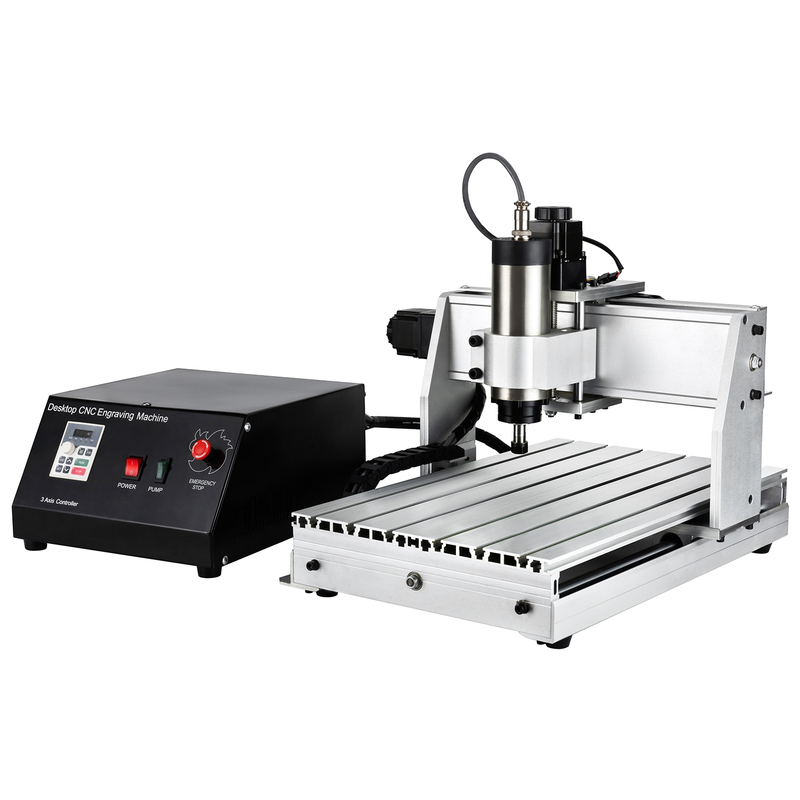
Choosing a model should come before discussing price. Many buyers start by asking, “How much is it?” A better first question is, “Which machine fits my real work?” A trusted Desktop CNC Router Manufacturer should guide you through material, workpiece size, and production goals before sending a quote.
Which desktop CNC router model fits my project?
Desktop CNC routers often look similar online, but they serve different users. A 3018 machine may suit learning and light engraving. A 6090 machine is closer to small-batch workshop production. The gap between them is not only size. It also includes frame strength, spindle power, travel height, and cutting stability.
Model Type
Typical Use
Buyer Checkpoint
3018 Desktop CNC Router
Hobby learning, PCB engraving, simple wood or acrylic work
Ask if the working area fits your smallest and largest parts. It is useful for beginners, but not for heavy cutting.
3020 Desktop CNC Router
School projects, DIY crafts, small signs
Check spindle upgrade options. More spindle power helps if you move beyond thin materials.
3040 Desktop CNC Router
Small workshop jobs and light production
Confirm travel size and fixture space. The usable area may be smaller after clamps are installed.
6040 Desktop CNC Router
Wood signage, acrylic cutting, soft metal light milling
Ask about ball screw transmission and frame stability. It suits users who need better repeat work.
6090 Desktop CNC Router
Larger panels, thicker materials, small-batch production
Confirm shipping size, floor space, and frame weight. It is stronger, but needs more planning.
Working area is not just a number on a product page. It decides what you can place, clamp, and cut. If your part is 300 mm wide, do not choose a machine with no extra clamping room. Leave space for fixtures and tool movement.
Production volume matters too. One sample per week is different from fifty parts per day. Ask the manufacturer if the model can handle your expected work rhythm. Longer cutting hours need stronger structure, better spindle matching, and easier maintenance.
What materials can the machine process safely?
Do not assume every desktop CNC router can cut every material. A small machine may engrave wood well, yet struggle with aluminum. Another model may cut acrylic cleanly, but need the right tool, speed, and spindle power.
Ask about these common materials:
Wood and MDF: These are common for signs, models, and craft parts. Ask about cutting depth, dust control, and tool size. MDF creates fine dust, so a clean setup matters.
Acrylic and plastic: These need proper speed control to avoid melting. Ask for edge quality examples. A test video can show whether the cut stays smooth.
PCB: Light desktop models can work well for PCB prototyping. Accuracy and flatness matter more than raw power. Ask about repeatable accuracy before ordering.
Aluminum, copper, and brass: These need more care. Ask if the machine supports light milling only, or deeper cutting too. The answer should include spindle power, feed rate, and frame rigidity.
A material test video is worth asking for. It shows real sound, vibration, chip removal, and finish quality. Photos can look perfect after cleanup. A cutting video is harder to fake.
Is the machine suitable for hobby use, teaching, prototyping, or small-batch production?
Your use case should decide the model level. Hobby buyers usually need simple setup and safe operation. Schools need easy training, clear manuals, and stable software. Small workshops need repeat accuracy, spare parts, and fast support.
For beginners, a smaller machine can reduce risk. It costs less, takes less space, and feels easier to learn. But it can become limiting once the work moves into thicker wood or soft metal parts.
For prototyping, flexibility matters more. Ask if the machine supports different spindle powers, 3-axis work, and optional 4-axis rotary use. Zhong Hua Jiang offers model choices from entry desktop machines to heavier 6040 and 6090 routers, so buyers can match the machine to real project needs.
For small-batch production, do not buy only for today’s smallest job. Ask the Desktop CNC Router Manufacturer about daily cutting time, replacement parts, and technical support. A slightly stronger model may save money once orders increase.
What Technical Specifications Should You Confirm Before Ordering?
Technical specifications can look simple on a quotation sheet, but they decide how the machine performs after delivery. Before choosing a Desktop CNC Router Manufacturer, ask for clear numbers, not only model names. A good supplier should explain working area, accuracy, feed rate, and machining ability in a way buyers can actually use. Zhong Hua Jiang’s desktop CNC router range, for example, covers compact 3018 machines through heavier 6040 and 6090 models, so the right choice depends on the work, not the name alone.
What is the working area and effective travel size?
The model number gives a quick clue, but it does not tell the full story. A 3040 machine sounds like it handles 300 × 400 mm work, yet the usable space may shrink after clamps, fixtures, tool paths, and safety margins are added. Always ask for the real effective travel size on X, Y, and Z axes.
Specification to Check
Why It Matters
Buyer Question
X/Y working area
Decides the maximum part size you can place and cut
Can my largest workpiece fit after clamps are installed?
Z-axis travel
Affects material thickness, tool length, and carving depth
What is the real clearance under the spindle?
Fixture space
Impacts repeat jobs and batch setup
Can I use clamps, jigs, or a vacuum table?
Machine footprint
Affects workshop layout and shipping cost
What are the machine and package dimensions?
If your workpiece is close to the machine limit, choose a larger model. It gives you room for safer clamping and smoother tool movement. This is especially useful for signs, acrylic panels, molds, and larger wood parts.
What is the positioning accuracy and repeatable accuracy?
Accuracy is not only about one perfect cut. It is about whether the machine can repeat the same result again. That is why buyers should ask about positioning accuracy, repeatable accuracy, and actual test reports before ordering.
For small craft work, a small error may not matter much. For PCB engraving, mold work, inlay cutting, or batch parts, it matters quickly. A slight shift can ruin holes, edges, and matching parts.
Ask the manufacturer for practical proof:
Request an accuracy test report for the target model. It should show tolerance data, not only marketing words. If the machine is used for repeat production, this report helps reduce purchase risk.
Ask how the machine holds accuracy under load. Cutting air is easy. Cutting MDF, acrylic, or aluminum creates force, heat, and vibration.
Confirm the structure behind the accuracy. Ball screws, linear rails, frame rigidity, and spindle stability all affect the final result.
A reliable Desktop CNC Router Manufacturer should connect accuracy claims to hardware design. If they cannot explain the frame, rail, and transmission structure, be careful.
What is the maximum feed rate under load?
Feed rate affects speed, edge quality, tool life, and production output. A high no-load speed may look impressive, but buyers should care more about the feed rate under real cutting conditions. The machine must move steadily while the tool is cutting material.
For wood and MDF, feed rate affects burning and edge finish. For acrylic, it helps prevent melting and rough edges. For aluminum, copper, or brass, the wrong feed rate can break tools or create poor surface quality.
Ask these questions before ordering:
What feed rate do you recommend for my material? The answer should include tool diameter, spindle speed, and cutting depth. A useful answer sounds specific, not vague.
Can you provide a cutting test video? It should show the machine cutting your target material. Listen for vibration and watch chip removal.
Does the feed rate change for engraving, cutting, and light milling? Each task needs different settings. One speed does not fit every job.
Can the machine handle engraving, cutting, drilling, light milling, and 3D carving?
A desktop CNC router can do many jobs, but each job needs the right setup. Engraving needs stable movement and fine tool control. Cutting needs enough spindle power and frame support. Drilling needs Z-axis stability. Light milling needs rigidity, suitable tools, and careful feed settings.
Buyers should be honest about their main use. A small 3018-style router may work well for learning, PCB work, and light engraving. A 6040 or 6090 model makes more sense for larger panels, soft metal light milling, and small-batch production.
Before ordering, ask the Desktop CNC Router Manufacturer to match the machine to your real workload. Share your material, thickness, drawing size, expected daily output, and finish requirement. They can then recommend a model, spindle power, and setup instead of selling the easiest machine on the list.
What Should You Ask About Spindle Power, Cooling Type, and VFD Matching?
Spindle setup is one of the biggest buying points. It decides what the machine can cut, how long it can run, and how smooth the finished edge looks. Before ordering from a Desktop CNC Router Manufacturer, ask how the spindle, cooling system, VFD, and voltage setup work as one system.
What spindle power options are available?
Spindle power should match the material, cutting depth, and daily workload. More power is not always better. A small school machine does not need the same spindle as a workshop cutting thick panels every day.
Is this enough for my material thickness and cutting depth?
800W
Better engraving, acrylic cutting, small wood parts
Can it run stable for my daily working hours?
1500W
Small workshop use, thicker wood, acrylic, light soft metal work
What tool size and feed rate do you recommend?
2200W
6040 or 6090 machines, stronger cutting, small-batch production
Does the frame and VFD match this power level?
A 300W spindle may suit simple signs or classroom training. An 800W spindle gives more room for daily craft work. A 1500W or 2200W spindle is better when the buyer needs deeper cuts, longer runtime, or light milling on aluminum and brass.
Should I choose an air-cooled spindle or water-cooled spindle?
Cooling type affects noise, maintenance, and working habits. Air-cooled spindles use fans to remove heat. They are easier to install because they do not need pumps, pipes, or coolant tanks.
Water-cooled spindles are often quieter. They can be useful in noise-sensitive shops. But they need coolant circulation, leak checks, and regular cleaning. For beginners, this can add extra work.
Ask these practical questions before deciding:
How many hours will the spindle run each day? Short jobs may work fine on simpler setups. Longer jobs need better heat control and stable spindle quality.
Is the workshop clean or dusty? Dust can affect fans, bearings, and cooling performance. Ask how often the spindle needs cleaning.
Can the supplier match the spindle to the router frame? A powerful spindle on a weak frame can create vibration. It may reduce accuracy instead of improving speed.
Zhong Hua Jiang manufactures its own CNC spindles and offers patented air-cooled spindle options. This matters because the machine, spindle, and inverter can be matched from the same supplier, instead of being pieced together after purchase.
Is the spindle matched with a VFD inverter?
A spindle does not work alone. The VFD inverter controls speed, startup, stop, acceleration, and protection settings. If the VFD parameters are wrong, the spindle may run hot, lose torque, trip alarms, or fail early.
Ask the Desktop CNC Router Manufacturer to confirm these details:
Is the VFD already programmed before shipment?
What spindle speed range is supported?
Are acceleration and deceleration settings tested?
Does the VFD match the spindle power and voltage?
Will the supplier provide parameter sheets and wiring diagrams?
This is especially important for 1500W and 2200W spindle setups. Higher power needs better matching. Buyers should not be left guessing after the machine arrives.
Can the desktop CNC router manufacturer adjust the setup for 110V or 220V?
Voltage is easy to overlook, but it can stop production on day one. International buyers should confirm local power standards before payment. A router prepared for the wrong voltage may need extra wiring, converters, or replacement parts.
Ask whether the machine supports 110V, 220V, or both. Also confirm the plug type, phase requirement, amperage, grounding method, and VFD input standard. These details affect safety and workshop readiness.
For distributors, schools, and overseas workshops, this step is not small. It helps avoid customs delays, installation mistakes, and support tickets after delivery. Share your country, workshop voltage, and expected machine model early, so the supplier can prepare the right configuration.
Conclusion
Asking detailed questions helps you avoid the wrong machine, hidden costs, and poor after-sales support.
A reliable Desktop CNC Router Manufacturer should give clear specifications, stable production, customization options, inspection records, and long-term technical help.
Before ordering, compare the model, spindle, software, warranty, and delivery details carefully.
For better model selection and technical guidance, contact Zhong Hua Jiang for a desktop CNC router solution that fits your real work.
FAQ
Q: What is the most important question to ask a desktop CNC router manufacturer?
A: Ask which model fits your material, workpiece size, accuracy needs, and daily workload.
Q: How do I know which desktop CNC router model is right for my material?
A: Share your material, thickness, and output target. Then request a test video.
Q: Is a 3018 desktop CNC router enough for beginners?
A: Yes. It suits students, hobbyists, PCB prototyping, wood, and thin acrylic engraving.
Q: When should I choose a 6040 or 6090 desktop CNC router?
A: Choose them for larger workpieces, stronger frames, soft metal milling, or small-batch production.
Q: Should I choose an air-cooled or water-cooled spindle?
A: Choose air-cooled for easier maintenance. Choose water-cooled for quieter operation.
Join us as an exclusive distributor of CNC Router Machines and CNC Spindle Motors. As a professional manufacturer, we provide high-performance machines, attractive profit margins, technical training, and full marketing support. Build a strong partnership with us and expand your market with confidence.


 English
 简体中文
简体中文 繁體中文
繁體中文 العربية
 Français
 Русский
 Español
 Português
 Deutsch
 italiano
 日本語
日本語 한국어
한국어 Nederlands
 Tiếng Việt
 ไทย
ไทย Polski
 Türkçe
 አማርኛ
አማርኛ ພາສາລາວ
 ភាសាខ្មែរ
 Bahasa Melayu
 ဗမာစာ
ဗမာစာ தமிழ்
தமிழ் Filipino
 Bahasa Indonesia
 magyar
 Română
 Čeština
 Монгол
 қазақ
қазақ Српски
 हिन्दी
 فارسی
فارسی Kiswahili
 Slovenčina
 Slovenščina
 Norsk
Norsk Svenska
 українська
 Ελληνικά
 Suomi
Suomi Հայերեն
 עברית
עברית Latine
 Dansk
Dansk اردو
اردو Shqip
Shqip বাংলা
বাংলা Hrvatski
 Afrikaans
 Gaeilge
 Eesti keel
 Māori
Māori සිංහල
සිංහල नेपाली
 Oʻzbekcha
 latviešu
 অসমীয়া
 Aymara
 Azərbaycan dili
 Bamanankan
 Euskara
 Беларуская мова
 भोजपुरी
 Bosanski
 Български
 Català
 Cebuano
 Corsu
Corsu ދިވެހި
 डोग्रिड ने दी
 Esperanto
 Eʋegbe
 Frysk
Frysk Galego
 ქართული
 guarani
 ગુજરાતી
 Kreyòl ayisyen
 Hausa
Hausa ʻŌlelo Hawaiʻi
 Hmoob
Hmoob íslenska
 Igbo
Igbo Ilocano
 Basa Jawa
 ಕನ್ನಡ
ಕನ್ನಡ Kinyarwanda
 गोंगेन हें नांव
 Krio we dɛn kɔl Krio
 Kurdî
Kurdî Kurdî
Kurdî Кыргызча
 Lingala
 Lietuvių
 Oluganda
 Lëtzebuergesch
 Македонски
 मैथिली
 Malagasy
 മലയാളം
 Malti
Malti मराठी
मराठी ꯃꯦꯇꯥꯏ (ꯃꯅꯤꯄꯨꯔꯤ) ꯴.
 Mizo tawng
 Chichewa
 ଓଡ଼ିଆ
ଓଡ଼ିଆ Afaan Oromoo
 پښتو
پښتو ਪੰਜਾਬੀ
 Runasimi
 Gagana Samoa
 संस्कृत
 Gaelo Albannach
 Sepeti
 Sesotho
 chiShona
 سنڌي
سنڌي Soomaali
 Basa Sunda
 Wikang Tagalog
 Тоҷикӣ
 Татарча
 తెలుగు
 ትግንያውያን
 Xitsonga
 Türkmençe
 संस्कृत
 ئۇيغۇرچە
 Cymraeg
 isiXhosa
 ייִדיש
 Yorùbá
 isiZulu