You are here:Home » News » Desktop CNC Router Supplier Checklist: Stock, Spare Parts, Technical Support, And Training
Desktop CNC Router Supplier Checklist: Stock, Spare Parts, Technical Support, And Training
Views: 0 Author: Site Editor Publish Time: 2026-09-24 Origin: Site
Choosing the cheapest router can cost more later.
A Desktop CNC Router Supplier should do more than ship a machine. Buyers also need clear stock, spare parts, support, and training.
Without these checks, delays, setup errors, and machine downtime can hurt daily work.
In this post, you’ll learn how to evaluate supplier reliability before ordering.
We’ll use Zhong Hua Jiang as a practical reference, with its desktop CNC routers, spindle motors, and matched VFD solutions.
Stock Availability and Delivery Checklist for a Desktop CNC Router Supplier
Stock sounds simple, but it often decides the whole buying experience. A good Desktop CNC Router Supplier should tell you what is ready, what needs production, and what may delay shipment. Before payment, ask for clear inventory proof, not only a friendly promise. This is especially important for schools, workshops, resellers, and buyers planning fixed production dates.
Confirm Real Stock Before Payment
Do not assume every listed machine is ready to ship. Many suppliers show popular models online, but the real stock may change fast. Ask whether the exact model, spindle power, control system, and voltage are available now. If one part is missing, the whole machine may wait. A simple stock check should cover:
Machine model: Confirm the size, such as 3018, 3020, 3040, 6040, or 6090. The supplier should not replace it later unless you approve it. Ask for photos or a short warehouse video. It helps you avoid a “similar model” shipment.
Core configuration: Check spindle power, controller type, axis option, and power voltage. These details affect setup, cutting ability, and software use. A wrong configuration may create extra cost.
Current order status: Ask if it is in stock, reserved, or under production. A supplier may have stock, but it could already be assigned. Written confirmation is safer.
Check Lead Times, Shipping Location, and Packaging
Lead time is not only production time. It also includes inspection, packing, customs documents, and pickup by the freight company. For standard desktop CNC router models, a ready-stock supplier may ship faster. Custom OEM/ODM orders usually need more time, because size, spindle power, logo, packaging, or control settings must be prepared.
Item to Confirm
Why It Matters
What to Ask
Standard model lead time
It affects project planning.
“When can this exact model ship?”
Custom order lead time
Custom parts need extra checks.
“How many working days are needed?”
Shipping location
It changes freight cost and transit time.
“Which warehouse or factory ships it?”
Export packaging
Poor packing can damage rails or frames.
“Is it packed for international transport?”
Package weight and size
Freight quotes depend on it.
“Can you provide the packing details?”
Review Starter Accessories Before Shipment
Starter accessories matter more than many new buyers expect. A machine may arrive on time, but missing tools can still stop the first test cut. Ask the supplier what comes inside the package, then compare it against your first-use needs. Do this before payment, not after delivery. Your starter package should be checked for:
Cutting and holding tools: Bits, clamps, tool holders, and basic maintenance tools should be confirmed. They help you run the first test without extra sourcing. If the supplier does not include them, ask for a recommended list.
Software and control items: Ask about GRBL, Candle, MACH3, offline controller support, cables, and setup files. Software confusion is a common beginner problem. Clear files reduce setup stress.
Manuals and setup resources: English manuals, wiring notes, and operation videos are useful. They help users avoid wrong wiring, loose parts, and axis direction errors. They also make training easier for teams.
Match Order Flexibility to Your Buying Plan
A strong Desktop CNC Router Supplier should support both small and large buying plans. If you are testing a new model, ask for a trial order first. If you are a distributor, ask about stable supply, repeat order timing, spare parts stock, and package consistency. These points matter because your customers will expect the same machine quality again. For bulk orders, do not only ask for the lowest price. Ask whether the supplier can keep stable output, inspect each machine, and prepare spare parts for later service. Also confirm if they can supply the same spindle power, controller, packaging, and accessories across the order. It saves time when your team handles installation, training, and after-sales support.
Spare Parts Checklist: Can the Supplier Reduce Machine Downtime?
A desktop CNC router is only useful when it keeps running. Before choosing a Desktop CNC Router Supplier, check how they handle spare parts. A low machine price means little if one broken switch stops production for two weeks. For schools, workshops, and distributors, spare parts support is part of the real machine cost.
Check Common Consumable Parts First
Start from the small parts, because they wear out fastest. Collets, carbon brushes, carving bits, clamps, tool holders, sacrificial beds, and maintenance tools should be easy to order. If these parts are hard to find, daily use becomes frustrating.
Ask the supplier for a consumable parts list before shipment. It should include part names, sizes, pictures, and recommended replacement timing. This helps your team prepare stock before the first heavy use period begins.
Collets and carving bits: These parts affect cutting accuracy every day. Poor or worn parts can cause vibration, rough edges, and tool slipping. Ask whether ER11, ER16, or ER20 options match the spindle.
Clamps and sacrificial beds: These items protect the machine and workpiece. They are easy to ignore during purchase. Yet they often decide how fast a beginner can start cutting.
Maintenance tools: Simple tools help users clean, tighten, and adjust the machine. They reduce support calls and avoid avoidable damage. A serious supplier should not treat them as an afterthought.
Confirm Critical Replacement Components
Some parts stop the whole machine when they fail. These include replacement spindles, stepper motors, controller boards, power supplies, limit switches, ball screws, guide shafts, and flexible couplings. A reliable supplier should know these parts well and keep them available.
Component Type
Parts to Confirm
Why It Matters
Electrical parts
Controller boards, power supplies, drivers, limit switches
They control startup, motion, and machine safety. Wrong parts can cause wiring errors.
Motion parts
Ball screws, guide shafts, couplings
They affect accuracy, backlash, and smooth movement. Wear here lowers cutting quality.
Cutting system
Spindles, collets, tool holders
They affect speed, vibration, and material finish. Matching matters more than price.
Support parts
Cables, switches, basic tools
They solve small issues fast. Missing parts can still stop work.
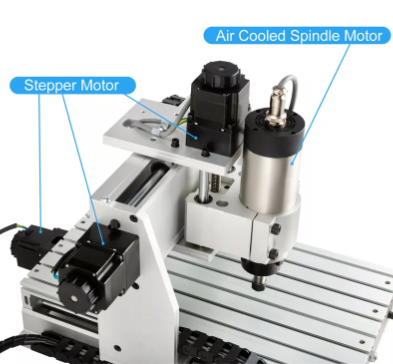
Zhong Hua Jiang is a useful reference here because its product system covers desktop CNC routers, air-cooled spindle motors, and VFD drives. This makes it easier for buyers to check the machine and key replacement parts under one supply source.
Ask Whether Parts Are Standard or Proprietary
Not every spare part is equal. Some machines use globally available standard parts, while others depend on supplier-exclusive components. Neither choice is always bad, but buyers should know it early.
Standard parts may be easier to source locally. Proprietary parts may fit better, but they tie you to the supplier’s stock. Supplier-exclusive parts can work well if the supplier keeps stable inventory and provides clear part numbers.
Ask these questions before ordering:
Can I buy this part locally if needed? This matters for urgent repairs. Local sourcing can save time during peak work periods. It also gives workshops more backup choices.
Do you provide part drawings or model numbers? Clear identification prevents ordering mistakes. It also helps technicians replace parts faster. Photos alone are not always enough.
Will parts remain available after model changes? Machines may be updated later. Buyers need support even after one model is discontinued. Ask for a written parts availability policy.
Match Spindle, VFD, and Urgent Shipping Support
Spindle and VFD matching is one of the easiest places to make mistakes. A mismatched VFD can cause poor speed control, overheating, weak torque, or startup faults. A Desktop CNC Router Supplier should provide matched spindle motors, VFD inverters, drivers, and control guidance.
This is especially important for higher-power desktop routers, such as 6040 or 6090 models. They often use stronger air-cooled spindles and more demanding control settings. When the supplier provides the spindle, VFD, and parameters together, setup becomes much easier.
Urgent shipping also needs attention. Ask whether spare parts can be shipped globally, tracked online, and packed safely. For distributors, one missing controller board can affect several customers at once. For workshops, fast delivery helps protect orders already in production.
Technical Support and Warranty Checklist for Desktop CNC Router Buyers
A Desktop CNC Router Supplier should be judged by what happens after delivery. The first setup often reveals small issues: wiring doubts, software errors, reversed axis movement, or strange spindle noise. Good support turns these problems into short pauses, not long delays. Before ordering, check how the supplier guides buyers through setup, troubleshooting, warranty claims, and later maintenance.
Check Support Channels and Response Windows
Do not rely on one contact method only. Email is useful for documents, but urgent problems need faster channels. WhatsApp, online chat, video calls, phone support, and remote one-on-one guidance all help when the machine stops during setup or production. Ask the supplier to explain its working hours before payment. Time zone coverage matters, especially for overseas buyers. A clear response window also keeps your team calm, because they know when help should arrive.
Support access: Ask which channels are used for sales, setup, warranty, and technical issues. A serious supplier should separate simple order questions from real engineering support. This helps you reach the right person faster.
Response time: Ask for normal reply time during business hours and busy seasons. Also ask what happens during holidays. For distributors, delayed answers can affect several customers at once.
Remote guidance: Video support is valuable for beginners. The engineer can see wiring, machine movement, software settings, and error prompts. It often solves problems faster than text messages.
Confirm Software Setup Support
Software setup is where many new users get stuck. A supplier should explain supported control systems before shipment, not after delivery. Desktop CNC routers may use MACH3 software, GRBL control software, Candle control software, offline controllers, or different G-code workflows.
Software Area
What Buyers Should Ask
Why It Matters
Control software
Does it support MACH3, GRBL, or Candle?
Users need the right setup path from day one.
G-code files
Which file formats are supported?
Wrong files can stop cutting or cause errors.
CAD/CAM setup
Are post-processor settings provided?
It helps users move from design to cutting.
Offline control
Is an offline controller included or optional?
It helps users work without constant PC connection.
Setup files
Are drivers, manuals, and videos included?
Clear files reduce beginner mistakes.
Review Troubleshooting Ability
A reliable Desktop CNC Router Supplier should help diagnose real machine problems, not only send generic advice. Ask whether they provide wiring diagrams, error code lists, firmware updates, and parameter guides. These resources help users solve startup errors, limit switch issues, spindle faults, and communication problems. Troubleshooting should also cover mechanical symptoms. Noise, vibration, loose couplings, poor axis movement, and cutting chatter can come from many causes. A good engineer will check the spindle, controller, drivers, ball screws, guide shafts, and software settings in the right order. For axis calibration, ask for a simple test method. The supplier should guide users through movement direction, steps-per-unit settings, travel limits, and repeat cutting checks. This matters for schools and workshops, because several operators may use the same machine.
Read the Warranty Terms Carefully
Warranty language should be specific. Ask which parts are covered, whether labor is included, and how defective part replacement works. Also confirm who pays return shipping, who pays resend shipping, and what proof is needed for a claim. Zhong Hua Jiang’s reference materials highlight 12-month warranty support and lifetime online technical guidance for desktop CNC router buyers. This is a useful benchmark when comparing suppliers. Buyers should still ask for written terms, because warranty scope can change by model, order type, and country. After the warranty period, support still matters. Ask whether paid parts, remote troubleshooting, software files, and maintenance advice remain available. A router may run for years, so the support plan should last longer than the first delivery.
Training and Documentation Checklist Before and After Delivery
Training is not a bonus item. It decides how fast a new user can turn a desktop CNC router into a working tool. A reliable Desktop CNC Router Supplier should prepare buyers before delivery, guide them during setup, and keep helping after the first test cut.
Check Assembly Guides and Setup Instructions
Good assembly documents save hours of guessing. Buyers should ask for step-by-step manuals, machine assembly videos, wiring instructions, and setup tutorials before shipment. These materials are especially useful for schools, new workshops, and resellers training first-time users.
The guide should show real machine details, not only generic diagrams. It should explain frame checks, cable connection, limit switch setup, spindle installation, controller wiring, and first power-on steps. If the machine includes an offline controller, the supplier should explain its menu and basic operation.
Ask for these items before payment:
Step-by-step manual: It should match the exact model ordered. Photos should show the same frame, controller, and spindle layout. A wrong manual creates confusion during setup.
Assembly and wiring videos: Videos help users see hand positions, cable routes, and machine movement. They are easier to follow than text alone. They also reduce avoidable support tickets.
First-test checklist: It should cover power, axis direction, spindle response, emergency stop, and basic cutting tests. This protects the machine from simple mistakes. It also gives beginners more confidence.
Review Beginner Operation Resources
Many buyers do not struggle because the machine is bad. They struggle because the first workflow is unclear. A good supplier should provide software operation walkthroughs, cutting parameter guides, safety notes, and G-code programming tutorials.
Training Resource
What It Should Cover
Why It Helps
Software walkthroughs
MACH3, GRBL, Candle, or offline control
Users can start the machine faster.
Cutting guides
Wood, acrylic, PCB, plastic, brass, soft aluminum
It lowers tool breakage risk.
Safety operation notes
Clamping, spindle start, emergency stop, dust control
For brands such as Zhong Hua Jiang, training can connect the router, air-cooled spindle motor, and matched VFD system into one workflow. This helps buyers avoid setup gaps between machine control, spindle speed, and cutting parameters.
Ask About Remote Onboarding Support
Remote onboarding is very helpful when the buyer has no local CNC technician. It lets the supplier check setup through video and answer questions in real time. Beginners can learn faster, while experienced users can confirm machine settings before production.
This support is useful for different buyer groups. School teachers may need safe classroom operation steps. Workshop operators may need material settings and maintenance routines. Distributors and resellers may need repeatable training materials for their own customers.
Ask whether live instruction can cover machine setup, software use, axis calibration, tool loading, basic programming, and safety operation. Also ask if sessions can be recorded. Recorded training helps new staff learn later without asking the same questions again.
Look for Self-Learning and Advanced Training Resources
Self-learning resources matter after the first week. PDF catalogs, cutting case galleries, troubleshooting FAQ documents, video tutorials, and downloadable maintenance guides help users solve common issues alone. This is where a supplier’s long-term attitude becomes clear.
A support group can also help. Supplier-moderated user groups, community forums, and shared troubleshooting tips let users learn from real cases. They are useful for repeated questions, simple repairs, software settings, and material tests.
Advanced training should not be ignored. Buyers may later add a 4-axis rotary attachment, test new materials, or improve cutting speed. Ask for 4-axis rotary carving guidance, material-specific cutting settings, refresh sessions, and after-sales follow-up training.
Conclusion
A good Desktop CNC Router Supplier provides more than a machine.
It should offer verified stock, complete spare parts, responsive support, clear training, and reliable documentation.
These details help reduce delays, setup mistakes, downtime, and long-term service risks.
Choose a supplier that supports the full machine lifecycle, from order confirmation to daily use, maintenance, troubleshooting, and future upgrades.
FAQ
Q: What should I check before choosing a Desktop CNC Router Supplier?
A: Check stock, lead time, spare parts, technical support, training, warranty, and documentation before ordering.
Q: Why is stock availability important when buying a desktop CNC router?
A: Real stock helps avoid shipment delays, missed project schedules, and uncertain delivery times.
Q: How do I know if a desktop CNC router is really in stock?
A: Ask for written confirmation, warehouse photos, model details, and shipment timing before payment.
Q: What spare parts should a reliable supplier keep available?
A: It should stock collets, spindles, VFDs, drivers, power supplies, limit switches, ball screws, and tools.
Q: Why are matched spindle motors and VFD inverters important?
A: Matched parts reduce setup errors, speed problems, overheating, and compatibility risks.
Join us as an exclusive distributor of CNC Router Machines and CNC Spindle Motors. As a professional manufacturer, we provide high-performance machines, attractive profit margins, technical training, and full marketing support. Build a strong partnership with us and expand your market with confidence.


 English
 简体中文
简体中文 繁體中文
繁體中文 العربية
 Français
 Русский
 Español
 Português
 Deutsch
 italiano
 日本語
日本語 한국어
한국어 Nederlands
 Tiếng Việt
 ไทย
ไทย Polski
 Türkçe
 አማርኛ
አማርኛ ພາສາລາວ
 ភាសាខ្មែរ
 Bahasa Melayu
 ဗမာစာ
ဗမာစာ தமிழ்
தமிழ் Filipino
 Bahasa Indonesia
 magyar
 Română
 Čeština
 Монгол
 қазақ
қазақ Српски
 हिन्दी
 فارسی
فارسی Kiswahili
 Slovenčina
 Slovenščina
 Norsk
Norsk Svenska
 українська
 Ελληνικά
 Suomi
Suomi Հայերեն
 עברית
עברית Latine
 Dansk
Dansk اردو
اردو Shqip
Shqip বাংলা
বাংলা Hrvatski
 Afrikaans
 Gaeilge
 Eesti keel
 Māori
Māori සිංහල
සිංහල नेपाली
 Oʻzbekcha
 latviešu
 অসমীয়া
 Aymara
 Azərbaycan dili
 Bamanankan
 Euskara
 Беларуская мова
 भोजपुरी
 Bosanski
 Български
 Català
 Cebuano
 Corsu
Corsu ދިވެހި
 डोग्रिड ने दी
 Esperanto
 Eʋegbe
 Frysk
Frysk Galego
 ქართული
 guarani
 ગુજરાતી
 Kreyòl ayisyen
 Hausa
Hausa ʻŌlelo Hawaiʻi
 Hmoob
Hmoob íslenska
 Igbo
Igbo Ilocano
 Basa Jawa
 ಕನ್ನಡ
ಕನ್ನಡ Kinyarwanda
 गोंगेन हें नांव
 Krio we dɛn kɔl Krio
 Kurdî
Kurdî Kurdî
Kurdî Кыргызча
 Lingala
 Lietuvių
 Oluganda
 Lëtzebuergesch
 Македонски
 मैथिली
 Malagasy
 മലയാളം
 Malti
Malti मराठी
मराठी ꯃꯦꯇꯥꯏ (ꯃꯅꯤꯄꯨꯔꯤ) ꯴.
 Mizo tawng
 Chichewa
 ଓଡ଼ିଆ
ଓଡ଼ିଆ Afaan Oromoo
 پښتو
پښتو ਪੰਜਾਬੀ
 Runasimi
 Gagana Samoa
 संस्कृत
 Gaelo Albannach
 Sepeti
 Sesotho
 chiShona
 سنڌي
سنڌي Soomaali
 Basa Sunda
 Wikang Tagalog
 Тоҷикӣ
 Татарча
 తెలుగు
 ትግንያውያን
 Xitsonga
 Türkmençe
 संस्कृत
 ئۇيغۇرچە
 Cymraeg
 isiXhosa
 ייִדיש
 Yorùbá
 isiZulu