You are here:Home » News » Compact CNC Router Machine for Small Workshops And Limited Space
Compact CNC Router Machine for Small Workshops And Limited Space
Views: 0 Author: Site Editor Publish Time: 2026-08-12 Origin: Site
Ever tried making parts with no spare floor space? A Compact CNC Router Machine can turn that tight room into a real workshop.
Small workshops need accuracy without extra clutter. The right machine should fit your space, cut your materials, and stay reliable.
In this post, we’ll cover fit (space planning), capability (wood, plastics, soft metals), setup (quick installation), and total cost (maintenance and after-sales support).
Space-first Checklist: How to choose a Compact CNC Router Machine for your small workshop
A Compact CNC Router Machine is only “compact” if it fits your real life. I’ve seen buyers focus on outer dimensions, then forget the cables, dust hose, and operator space. Measure first. Decide second. You’ll save weeks of frustration.
A quick way to think about it: your shop has constraints, not just a footprint. When a machine runs, it needs working clearance, wiring room, and airflow space. Those details decide whether the machine feels easy or annoying day after day.
1) Measure your real constraints (not just the machine size)
Start by mapping the path from the machine to everything it needs. That includes power, dust extraction, and even how you’ll reach the tool after it’s mounted.
Use this checklist so you don’t miss the “invisible” items people forget:
Door clearance / corridor width: Measure the narrowest point where the machine would pass. Add 5–10 cm for packaging and turning angles. If you plan delivery through an alley, re-check the route, not the showroom distance.
Bench dimensions and available height: Confirm the table can support weight, and check the height for cable loops. A low shelf under the bench can block the integrated control/electrical space. Also check how much clearance you have above the spindle area.
Dust collection outlet position: Look for where the hose will connect during operation. If your vacuum hose catches on shelves, you’ll reroute the entire shop. It’s easier to plan now than to “make it work” later.
Power access and cable routing: Identify the outlet type and cable reach. Avoid running cables across walkways where chips and dust collect. If you need an extension, ensure it can handle the load safely.
Now compare what matters most: occupied footprint versus outer dimensions. A “small” outer size can still demand extra room once you include the hose, emergency stop access, and cable clearance.
Measurement you check
Why it matters in a small workshop
What to do
Occupied footprint
Real usable space during operation
Include hose + cable clearance
Machine outer dimensions
Packaging + placement estimate
Confirm it passes through doors
Z-axis space
Depth for parts and thickness
Ensure enough Z travel for your jobs
2) Footprint expectations: what buyers typically search for
Most shoppers search for “desktop CNC,” then discover job size is the real constraint. A bench-top Compact CNC Router Machine usually feels right in the 24" x 24" to 36" x 36" class. Some setups are smaller. Others use a dedicated cart.
But don’t stop at tabletop size. You want to match effective working travel to the parts you actually make.
Bench-top size ranges (desktop class): Plan for the machine itself plus clearance around it. Many users need a front area for feeding materials and checking alignment. If your bench is tight, the “compact” promise can turn into constant bumping.
Effective working travel vs overall dimensions: Overall size looks stable on paper. Travel size determines what you can cut, carve, and drill. For small workshops, travel size often defines whether you can do one larger plate or only small parts.
Vertical clearance (Z-axis travel): Z-axis travel decides how thick your stock can be. Thin sheet parts and small blanks feel easy. Sheet goods or thicker setups need more headroom, plus safe tool length.
Below is a simple way to map travel to work types.
Your main work
What to prioritize
Common fit for compact machines
Small engraving / PCB work
Z-axis for tool contact, travel for layouts
Desktop class travel works well
Sign making / relief carving
X/Y travel + spindle speed control
Larger desktop models fit more jobs
Plastic prototypes / routing blanks
Z travel + stable rigidity
Compact rigid frame designs help
For limited space, vertical clearance becomes even more important because you can’t “just move things around” easily.
3) Placement options that work in limited space
Placement isn’t one decision. It’s a layout strategy. Your best option depends on how you handle dust and where you store materials.
Directly on a normal workbench
This is the simplest move. A good Compact CNC Router Machine often fits on a standard bench without turning your workshop into a construction site. Still, check how the dust hose routes from the top-mounted connection and whether the bench leg blocks it.
Against wall / corner placement
Corner placement saves floor space, but it changes how you access the machine. Make sure you can reach controls quickly and remove parts safely after a cut. Also verify the dust line doesn’t run into a wall edge and restrict airflow.
Mobile cart / workshop layout changes
If your workshop rearranges weekly, mobility matters. Lightweight frames plus stable positioning let you shift the machine when production changes. The catch is cables and hose length. Plan cable slack and hose routing so moving doesn’t create new friction points.
Noise and dust control also shape placement. In indoor spaces, enclosed or dust-interface-friendly setups matter. A quiet-running spindle helps you keep operations near other workstations without constant disruption.
4) “No fixed foundation?”—what it means for real customers
“No fixed foundation” doesn’t mean “place anywhere and ignore everything.” Compact designs emphasize easier setup, but you still need a level surface and safe cable habits.
Here’s what to check so the machine behaves well in day-to-day use:
Level surface: Confirm the bench or floor is stable. Even small unevenness can affect repeatability during longer jobs.
Vibration sources: Keep the machine away from heavy door slams, compressors, or high-traffic areas. In a small workshop, vibration travels farther than people think.
Cable safety: Route cables so chips don’t collect at bends. Avoid places where the hose or power cord rubs the machine frame during movement.
What this really means for customers is simple: compact machines are designed to reduce the install burden. You spend less time building infrastructure and more time cutting parts. That matters when your workshop’s “real estate” is the bottleneck, not your budget.
A Compact CNC Router Machine feels “right” because it behaves like a small industrial tool, not a toy. When it cuts smoothly, they’re usually doing one quiet thing well: rigidity. Another quiet thing is the electronics layout, often built into the machine structure to reduce clutter.
Most buyers notice the difference only after the first job. Less chatter during carving. Fewer setup annoyances. Cleaner workspace because the wiring and dust parts aren’t scattered everywhere. Those small wins add up fast in a limited shop.
1) Rigid frame design vs moving-bed designs
Rigidity is simple: the frame should stay steady while the spindle pushes into the material. If the machine flexes, the tool loses its “path,” and you see it as rough edges or inconsistent depth.
Moving-bed setups can feel fine at light cuts. Under repeated engraving passes or small-batch production, flex adds up. With a rigid compact frame, it helps keep depth and line width consistent across a run.
When rigidity matters, it shows up in exactly the kind of work small workshops do:
Engraving quality: steadier tool path means cleaner lettering edges
Small-batch consistency: the second and third part look like the first
Tool choice flexibility: bits last longer because contact stays more controlled
Here’s a practical comparison you can use when shopping.
Design approach
What you feel during cutting
Typical impact in small workshops
Rigid frame design
Less vibration, steadier depth
Cleaner engraving, fewer reworks
Moving-bed designs
More motion-related flex under load
Depth drift, chatter on longer jobs
2) Integrated control boxes (less clutter, faster setup)
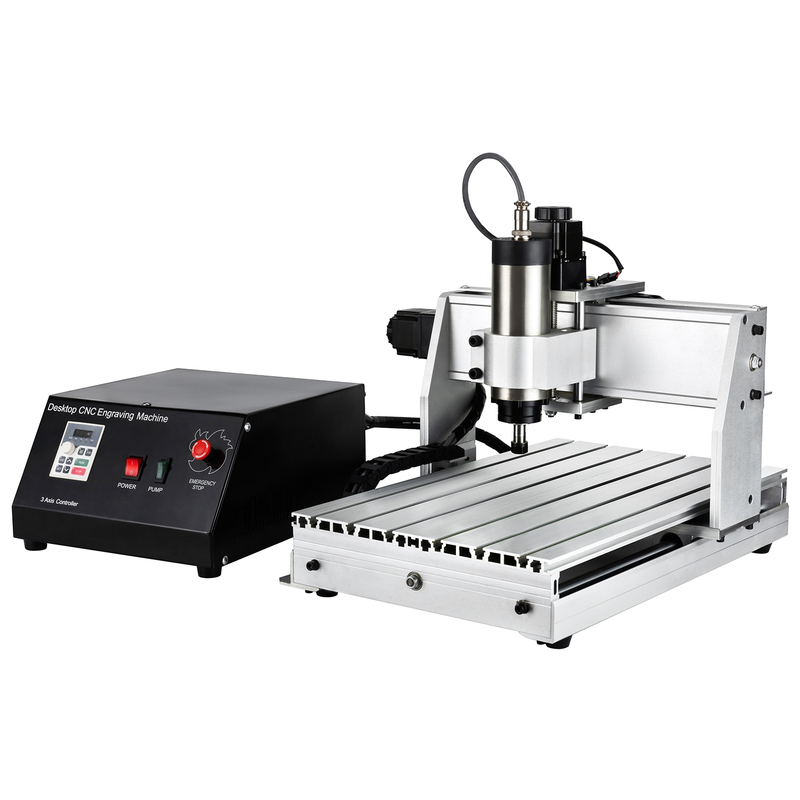
A lot of “space-saving” claims ignore what happens after delivery. In real workshops, they don’t want an extra control tower taking desk space. A well-designed Compact CNC Router Machine often keeps electronics inside or under the machine cabinet.
That one choice changes your day-to-day workflow:
Fewer external cabinets mean less occupied space and fewer cable runs
Simpler wiring means faster first-start and quicker troubleshooting
Reduced cable confusion during moves, reassembly, or tool changes
A typical wiring simplification workflow looks like this in practice:
1. Connect spindle + VFD control wiring through the integrated layout
2. Route USB/Ethernet/control cables away from the dust path
3. Test spindle rotation and limit switches before the first engraving file
4. Save a baseline parameter set so repeat jobs feel predictable
3) Enclosure compatibility: safety + cleanliness in small workshops
Enclosure compatibility is where the compact design becomes practical, not just small. Indoor workshops care about dust and noise because customers share the space with people, shelves, and machines. Dust containment also impacts tool life and cleanup time.
What to expect from a compact router setup:
Dust containment expectations: a dust boot and an interface reserved for hose connection
Noise reduction expectations: dedicated spindle style can run quieter than common hand routers
Dust collection interface concepts: top-mounted or reserved interface designs that reduce hose snagging
Hose routing matters more than people think. If the hose line crosses walls or drags over tight corners, chips and debris find the path for you. A smarter layout keeps the hose route short, smooth, and away from emergency stop access.
One more detail that feels “small but huge” in daily use: when electronics are integrated, dust stays farther from sensitive components. That reduces the chance that a small workshop needs constant cleaning rituals before every job. For compact setups, it’s the difference between “ready to cut” and “always wiping first.”
Performance Fit: Match spindle power + VFD to the materials you cut
A Compact CNC Router Machine only “works” when spindle power and speed match the job. Many small workshops buy a compact unit, then blame the machine when feeds are off. Most of the time, it’s a mismatch: spindle speed, tooling, and material hardness.
Here’s a buyer-friendly way to think about it. They choose materials first, then choose spindle/VFD behavior that supports those materials without pushing the bits too hard.
1) Materials small workshops commonly cut
Small shops usually don’t cut one thing. They cut signs today, prototypes tomorrow, then PCB blanks next week. Your spindle and VFD setup should cover that mix without making every job a fight.
Soft metals: engraving/milling with correct settings, aluminum, brass, copper
Prototyping mediums: MDF blanks, PCB blanks
The practical point is simple: each material “wants” a different RPM range and depth-of-cut style. A flexible spindle speed helps you keep tool load stable.
Material type
Typical work in small shops
Speed behavior to look for
Hardwood/Softwood
signs, relief carving, lettering
medium RPM control for clean edges
Plywood/MDF
prototypes, parts, tooling foam
stable RPM for consistent cutting chips
Acrylic/Plastics
acrylic, HDPE, PVC
faster, controlled RPM to avoid melting
Carbon fiber (light duty)
shallow passes, routing skins
consistent RPM, shallow depth, reduced chatter
Soft metals
aluminum, brass, copper engraving
RPM control + conservative feed strategy
PCB blanks
PCB drilling and routing
repeatable speed for tight geometry
2) Why a VFD-controlled spindle is practical for small shops
A VFD lets the spindle speed change instead of forcing one speed for everything. Fixed-speed trim tools feel “fine” until the day you switch materials or bit diameter. Then results swing: rough edges, burning, or bit wear.
With a VFD-driven spindle, shops usually get:
Speed control for different tooling + materials so each job starts closer to the right settings
More predictable results vs fixed-speed because RPM can match bit load and chip formation
Quiet operation advantage since indoor studios and garages care about noise levels during longer carving runs
Even when the machine specs look similar, VFD control changes your routine. People can tune output for acrylic versus MDF, not just for “wood” in general. Less trial time means more usable production hours.
3) Air-cooled vs water-cooled spindles (compact workstation view)
Cooling style is a day-to-day decision in a limited workspace. It affects maintenance workload, how you run continuously, and whether your spindle stays consistent on longer jobs.
Air-cooled: simpler maintenance, common for compact classes
fewer liquid plumbing steps
easier “setup once and run” workflows
a good fit for small workshops that do shorter batches
Water-cooled: higher capacity option when you need more sustained duty
better suited for longer runs and heavier spindle demands
adds a cooling system responsibility, which matters in tight spaces
For larger desktop configurations, the key phrase people should remember is spindle speed adjustable. It’s the practical capability behind “cutting different materials.” When speed changes smoothly, they can keep surface finish and tool life more stable across jobs.
4) Practical buying signals for spindle + VFD fit
When you’re comparing a Compact CNC Router Machine, don’t only ask “how many watts.” Ask how the spindle and VFD help you stay consistent.
Look for these real-world signals:
Adjustable RPM range aligned with your expected materials (wood, plastics, soft metals)
Matching VFD behavior that doesn’t cause instability during starts and speed transitions
Tooling compatibility so feed rate can align with the RPM you can actually control
A workshop that cuts acrylic and aluminum in the same week usually benefits most from VFD speed control. A workshop focused only on MDF signs can still do well, but they’ll feel the difference as soon as they expand beyond one material.
Conclusion
Choosing the right Compact CNC Router Machine means matching real constraints, not marketing claims. Fit it to your footprint, clearance, and bench placement; cut with spindle/VFD speed control and rigid transmission for your material. Then protect uptime with warranty, spare parts, and remote technical support. Next, verify your largest part size, available floor footprint and height, and your priority material list. A supplier strong in compact desktop CNC routers and spindle/VFD ecosystems can make that easier.
Join us as an exclusive distributor of CNC Router Machines and CNC Spindle Motors. As a professional manufacturer, we provide high-performance machines, attractive profit margins, technical training, and full marketing support. Build a strong partnership with us and expand your market with confidence.


 English
 简体中文
简体中文 繁體中文
繁體中文 العربية
 Français
 Русский
 Español
 Português
 Deutsch
 italiano
 日本語
日本語 한국어
한국어 Nederlands
 Tiếng Việt
 ไทย
ไทย Polski
 Türkçe
 አማርኛ
አማርኛ ພາສາລາວ
 ភាសាខ្មែរ
 Bahasa Melayu
 ဗမာစာ
ဗမာစာ தமிழ்
தமிழ் Filipino
 Bahasa Indonesia
 magyar
 Română
 Čeština
 Монгол
 қазақ
қазақ Српски
 हिन्दी
 فارسی
فارسی Kiswahili
 Slovenčina
 Slovenščina
 Norsk
Norsk Svenska
 українська
 Ελληνικά
 Suomi
Suomi Հայերեն
 עברית
עברית Latine
 Dansk
Dansk اردو
اردو Shqip
Shqip বাংলা
বাংলা Hrvatski
 Afrikaans
 Gaeilge
 Eesti keel
 Māori
Māori සිංහල
සිංහල नेपाली
 Oʻzbekcha
 latviešu
 অসমীয়া
 Aymara
 Azərbaycan dili
 Bamanankan
 Euskara
 Беларуская мова
 भोजपुरी
 Bosanski
 Български
 Català
 Cebuano
 Corsu
Corsu ދިވެހި
 डोग्रिड ने दी
 Esperanto
 Eʋegbe
 Frysk
Frysk Galego
 ქართული
 guarani
 ગુજરાતી
 Kreyòl ayisyen
 Hausa
Hausa ʻŌlelo Hawaiʻi
 Hmoob
Hmoob íslenska
 Igbo
Igbo Ilocano
 Basa Jawa
 ಕನ್ನಡ
ಕನ್ನಡ Kinyarwanda
 गोंगेन हें नांव
 Krio we dɛn kɔl Krio
 Kurdî
Kurdî Kurdî
Kurdî Кыргызча
 Lingala
 Lietuvių
 Oluganda
 Lëtzebuergesch
 Македонски
 मैथिली
 Malagasy
 മലയാളം
 Malti
Malti मराठी
मराठी ꯃꯦꯇꯥꯏ (ꯃꯅꯤꯄꯨꯔꯤ) ꯴.
 Mizo tawng
 Chichewa
 ଓଡ଼ିଆ
ଓଡ଼ିଆ Afaan Oromoo
 پښتو
پښتو ਪੰਜਾਬੀ
 Runasimi
 Gagana Samoa
 संस्कृत
 Gaelo Albannach
 Sepeti
 Sesotho
 chiShona
 سنڌي
سنڌي Soomaali
 Basa Sunda
 Wikang Tagalog
 Тоҷикӣ
 Татарча
 తెలుగు
 ትግንያውያን
 Xitsonga
 Türkmençe
 संस्कृत
 ئۇيغۇرچە
 Cymraeg
 isiXhosa
 ייִדיש
 Yorùbá
 isiZulu