You are here:Home » News » How To Choose A Desktop CNC Router Machine: 4 Key Steps
How To Choose A Desktop CNC Router Machine: 4 Key Steps
Views: 0 Author: Site Editor Publish Time: 2026-07-06 Origin: Site
Buying the wrong CNC machine can turn a simple project into wasted time, rough cuts, and costly mistakes. ADesktop CNC Router Machineis more than a small tool—it is a compact computer-controlled machine for engraving, cutting, drilling, and milling.
For hobbyists, schools, sign makers, startups, and small workshops, choosing the right model matters. The wrong choice can mean weak cutting power, poor accuracy, vibration, and high maintenance costs.
In this post, you’ll learn four key steps to choose the right size, material capacity, spindle power, frame structure, control system, and support.
What Is a Desktop CNC Router Machine?
Basic Definition of a Desktop CNC Router Machine
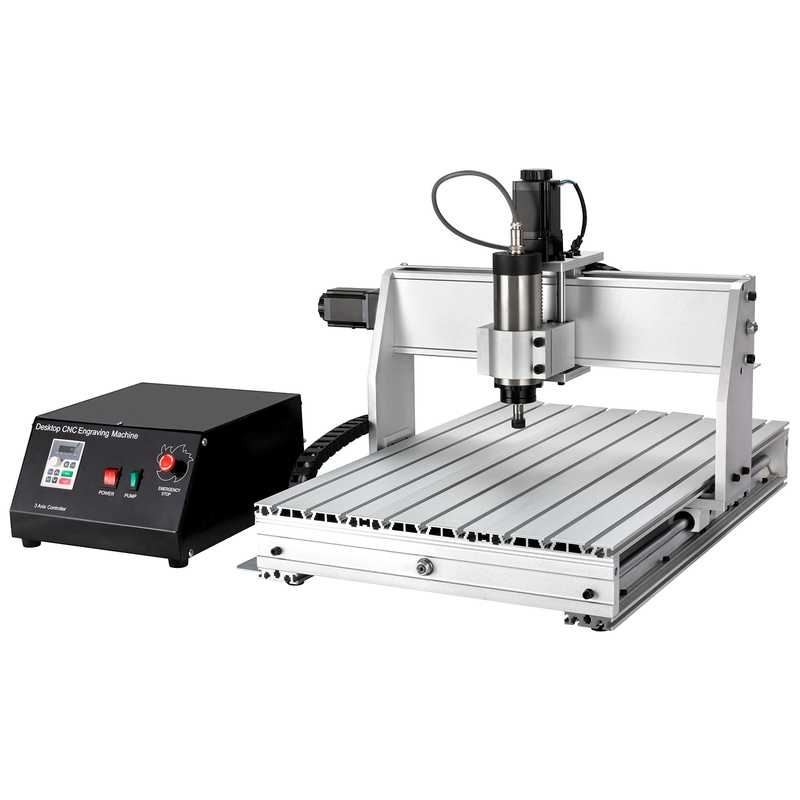
ADesktop CNC Router Machineis a compact CNC engraving and cutting machine built for small shops, studios, classrooms, labs, and light production rooms. It uses computer control to move a cutting tool across X, Y, and Z axes, so it can engrave, cut, drill, mill, or carve materials much more consistently than hand tools. It is small enough for limited spaces, yet it still supports repeatable machining when the frame, spindle, motion system, and software match the job.
In daily use, it starts from a digital design. You create or import a CAD/CAM file, convert it into toolpaths, then send those paths to the control system. The machine follows those instructions step by step, which helps reduce manual errors, save material, and keep each part close to the same size. This is why many small workshops use it for custom signs, samples, product prototypes, and short production runs.
A good desktop CNC router machine can process many common materials, but each material needs the right setup. Wood, MDF, plywood, acrylic, PVC, plastics, PCB boards, aluminum, copper, and brass all place different demands on spindle power, frame rigidity, feed speed, and tooling. For example, softwood engraving may only need moderate power, while aluminum work needs stronger rigidity and more stable cutting control.
What Can a Desktop CNC Router Machine Do?
Think of it as a practical production tool, not just a hobby machine. It helps users move from manual work to digital machining, especially when the parts need clean edges, repeatable size, or detailed surface patterns.
Engraving, carving, and decorative work: It can engrave logos, text, relief patterns, nameplates, crafts, molds, and decorative panels. This makes it useful for sign makers, school labs, makers, gift shops, and woodworking studios. It works especially well when the design has fine details needing steady motion and smooth spindle speed.
Cutting, milling, and drilling: It can cut acrylic signs, trim wood panels, mill small parts, drill holes, and shape components from MDF, plywood, plastics, or soft metals. For small furniture parts, cabinet samples, PCB engraving, and lightweight aluminum pieces, it gives users a controlled process rather than guesswork. The final quality still depends on tool choice, material thickness, spindle power, and machine stability.
Small-batch business production: It suits low-volume orders, customized parts, product testing, education, and workshop-level manufacturing. A Huajiang 6040 desktop CNC router, for example, fits smaller crafts, PCB work, and learning tasks, while a 6090 model gives more space for larger signs, panels, and furniture components. This kind of model choice helps buyers avoid paying for unused size or losing jobs due to limited work area.
Desktop CNC Router Machine vs. Industrial CNC Router
Comparison Point
Desktop CNC Router Machine
Industrial CNC Router
Size
Compact, easier to place in small workshops, classrooms, home studios, or startup spaces. It usually needs less floor space, less setup work, and simpler daily operation. It is a better fit when projects stay small or medium in size.
Large, heavy, and built for factory floors. It needs more installation space, stronger site planning, and higher power support. It is better for full-size sheets, large panels, and demanding production lines.
Cost
More affordable for beginners, small businesses, schools, and makers. It lowers the entry barrier while still offering CNC accuracy for many common materials. It also helps buyers test market demand before investing in larger equipment.
Higher investment due to bigger frames, stronger motors, automation options, and industrial components. It may bring strong output, but only when the order volume justifies the cost. It is not always practical for small custom jobs.
Production Fit
Best for DIY projects, signs, PCB engraving, crafts, prototypes, samples, and small-batch production. It gives flexibility when product types change often. It is also easier for new operators to learn.
Best for mass production, heavy workloads, large panels, and long operating hours. It focuses on speed, output, and automation. It usually needs trained operators and a larger production plan.
Step 1 — Define Your Application Before Choosing a Desktop CNC Router Machine
What Materials Will You Cut or Engrave?
Before choosing aDesktop CNC Router Machine, start from your real materials, not from machine photos or prices. A small CNC router may look similar across brands, yet wood, acrylic, PCB boards, aluminum, brass, and copper all need different spindle power, cutting speed, tool strength, and frame stability. I always suggest listing current jobs first, then adding future jobs you may take in the next one or two years.
Material Group
Common Materials
What It Means for Machine Selection
Wood materials
Softwoods, hardwoods, MDF, plywood
Softwoods are easier to cut, while hardwoods need better rigidity and stronger spindle power. MDF and plywood need stable motion, sharp tools, and good dust control.
Plastic materials
Acrylic, PVC, general plastics
These materials need smooth spindle speed and clean toolpaths. Poor speed control may cause melting, rough edges, or uneven surfaces.
Electronics work
PCB boards
PCB engraving needs high precision, small tools, and stable repeatability. A compact working area is usually enough, but accuracy matters a lot.
Soft metals
Aluminum, brass, copper, other soft metals
These materials need stronger structure, more stable motion control, and suitable cooling. Weak frames may vibrate, leaving poor edges or broken tools.
Choose Based on the Hardest Material You Plan to Process
Many buyers make one mistake: they choose based only on the material they cut most often. It sounds reasonable, but it can limit the machine fast. If you mostly engrave wood today yet plan to cut aluminum next month, your machine must be selected for aluminum, not only wood. If aluminum or hardwood is part of your plan, it needs more than basic spindle power. It needs a rigid frame, stable linear guides, ball screw transmission, and smooth control. A weak desktop CNC router machine may still move through the material, but it may leave chatter marks, lose accuracy, or wear tools too quickly. A useful way to decide is simple: pick your machine based on the hardest material, thickest material, and most demanding job. For light engraving, an 800W spindle may work. For general wood, acrylic, and small shop tasks, 1500W often feels balanced. For hardwood, thicker pieces, or soft metals, 2200W gives more room.
Match the Desktop CNC Router Machine to Your Main Application
Different jobs need different priorities, so do not let one specification decide everything. A jewelry user may care most about fine detail, while a furniture shop may care more about working area and frame strength. A sign maker may need smooth acrylic edges, while a PCB user may need precise small-line engraving.
Jewelry and PCB engraving: Choose a smaller machine, high precision, and stable repeatability. It does not need a huge working area, but it must hold fine detail well. Huajiang 6040, for example, fits small crafts, education, PCB engraving, and detailed work due to its 600×400mm working area.
Acrylic signs and advertising products: Focus on spindle speed, clean motion, and smooth cutting results. Acrylic can look poor if the machine vibrates or spindle speed is unstable. A desktop CNC router machine in this category should support common CAD/CAM software, since sign work often changes from job to job.
Woodworking and furniture parts: Choose a larger working area and stronger frame. Cabinet samples, decorative panels, and furniture components need room, especially when batch work begins. Huajiang 6090, using a 600×900mm working area, suits larger panels, sign making, and small-scale production better.
Aluminum and soft metals: Prioritize spindle strength, frame rigidity, toolpath stability, and cooling planning. Soft metals punish weak machines quickly. They may still cut, but they often create noise, vibration, rough edges, or poor tool life if the structure is too light.
Questions Buyers Should Ask Before Purchase
Before placing an order, write down five answers. What is the largest workpiece I need to process? What is the thickest material I need to cut? Do I need engraving only, or both engraving and cutting? Will I use it for hobby projects or business production? Do I need future upgrade options such as stronger spindle power, rotary fixtures, or a larger working area? These questions protect you from buying too small, too weak, or too complex. They also help the supplier recommend a practical configuration instead of a generic machine. Once your application is clear, comparing 6040 versus 6090, 800W versus 1500W versus 2200W, or compact use versus small production becomes much easier.
Step 2 — Choose the Right Working Area and Machine Size
Why Working Area Matters So Much
When choosing aDesktop CNC Router Machine, working area should be one of your first checks. It decides the largest material size the machine can process, so it directly affects what jobs you can accept. A machine may look large from the outside, yet its real cutting area can be smaller than its overall body size. Always separatemachine dimensionsfromeffective cutting area. Machine dimensions tell you how much shop space it needs. Effective cutting area tells you how much material it can actually process. You also need extra room around it for loading boards, removing finished parts, changing tools, cleaning dust, and doing basic maintenance. Here is a simple way to think about it:
Size Factor
What It Means
Why Buyers Should Care
Overall machine size
Full physical size of the machine
It affects shop layout, transport, installation, and operator movement.
Working area
Real X/Y cutting range
It decides the maximum board, sign, panel, or part size it can process.
Operation space
Extra space around the machine
It helps loading, unloading, tool changes, dust cleaning, and safe daily use.
Future capacity
Space for larger jobs later
It prevents early replacement when projects become bigger.
Small Desktop CNC Router Machine for Fine Work
A smallDesktop CNC Router Machineis often the smarter choice when your work is fine, detailed, or space-limited. Jewelry, PCB boards, small signs, models, crafts, samples, and training projects rarely need a huge table. They need stable movement, clean engraving, good repeatability, and simple operation. This is where a Huajiang 6040 desktop CNC router fits well. Its 600×400mm working area suits hobby projects, education, PCB engraving, small crafts, acrylic pieces, wood parts, and light soft-metal tasks. It is compact, easier to place in a small workshop, and friendly for users still learning CNC operation. I would pick this size if the workpieces stay small, the budget needs control, or the shop has limited room. It gives you enough space for many custom products, yet it does not force you to pay for table size you may never use. For schools, makers, and small studios, this balance matters a lot.
Larger Desktop CNC Router Machine for Small Production
A largerDesktop CNC Router Machinemakes more sense when you handle signs, panels, furniture parts, decorative boards, or repeat orders. Small-batch production needs more table space, especially when you want to process several parts in one setup. It saves handling time and keeps daily workflow smoother. Huajiang 6090 is a practical example. Its 600×900mm working area gives more room for acrylic signs, wood panels, furniture components, plastics, PCB boards, and soft metals. It also has a heavier structure than smaller desktop models, so it can feel steadier during longer cutting jobs. For a business user, this extra space can quickly become useful. You can place larger material, arrange multiple small parts, or reduce setup changes between jobs. If you plan to move from hobby work into paid orders, 6090 usually gives more room for growth.
Consider Z-Axis Clearance and Material Thickness
Working area is not only about length and width. Z-axis clearance decides how tall your material, fixture, or clamping setup can be. If it is too low, thick wood, raised fixtures, rotary devices, or special clamps may not fit well. This matters more than many new buyers expect. A machine may have enough X/Y area, yet still fail when the material is thick or the tool needs more vertical travel. It can limit carving depth, restrict fixture use, and make future upgrades harder. Before buying, check these points carefully:
Choose 6040 if you mainly do hobbies, education, jewelry, PCB engraving, small crafts, models, or compact sign work. It is easier to install, easier to learn, and more space-saving. It works best when your workpieces stay small and precision matters more than table size.
Choose 6090 if you need larger signs, furniture components, decorative panels, batch processing, or small production. It gives more working space and better growth potential. It is a better fit when you expect order size or material size to increase.
Check Z-axis clearance before deciding. Think about your thickest material, longest tool, fixture height, and possible rotary device. If any of these need more vertical space, choose a configuration designed for it from the start.
Step 3 — Evaluate Spindle Power, Speed, and Cooling System
Why the Spindle Is the Core of a Desktop CNC Router Machine
The spindle decides how well aDesktop CNC Router Machinecuts, engraves, mills, or drills. It affects cutting power, surface finish, machining speed, tool life, and material range. If it is too weak, the machine may still run, yet it will cut slowly, leave rough edges, and limit future jobs.
For Huajiang 6040 and 6090 desktop CNC router models, common spindle options include800W, 1500W, and 2200W air-cooled spindles, plus a speed range of10,000–24,000 RPM. These options cover light engraving, general shop use, and heavier cutting needs.
How Much Spindle Power Do You Need?
Spindle Power
Best Use
Practical Advice
800W
Light engraving, soft wood, acrylic, hobby work
It works well for beginners, schools, and small craft users. Pick it if your jobs stay light and detail-focused.
1500W
General wood, MDF, plywood, plastics
It gives a good balance between power, cost, and control. Many desktop users will feel comfortable here.
It gives more cutting room, but it also needs a rigid frame and stable motion. More power alone will not fix a weak machine.
Why Spindle Speed and Cooling Matter
High speed helps fine engraving, clean edges, and smooth surface finish. For acrylic, plastics, PCB boards, and detailed wood patterns, stable RPM often matters more than raw power. For harder materials, lower-speed stability can matter more than the maximum number on the spec sheet.
Air-cooled spindles are practical for most desktop users because they are simple, cost-effective, and low maintenance. Water-cooled spindles suit longer runs and heavier machining, especially when heat becomes a problem. For Huajiang 6040 and 6090 users, air-cooled spindle options make sense for daily desktop work.
Match Spindle Performance to Materials
For wood, MDF, and plywood,800W–1500Wcan handle many normal tasks. Acrylic and plastics need smooth spindle speed plus steady motion, so the cut stays clean instead of melted. Hardwood, aluminum, brass, copper, and other soft metals usually need2200W, better rigidity, and smarter cutting settings.
Step 4 — Check Frame Rigidity, Accuracy, Software, and After-Sales Support
Why Frame Rigidity Affects Cutting Precision
ADesktop CNC Router Machinemust stay steady while it cuts. If the frame flexes, vibration appears fast. Then you see rough edges, tool marks, poor surface finish, inaccurate holes, and parts no longer match each other.
For high-speed engraving, rigidity matters more than many new buyers expect. A solid frame helps it keep smooth motion, even during deeper cuts or repeated jobs. For batch production, this is where good machines save time, tools, and material.
What Structure and Accuracy Should You Check?
Huajiang’s desktop CNC router reference uses an aluminum structure, ball screw transmission, linear rails, and a listed accuracy of±0.05mm/300mm, which gives buyers a useful benchmark for comparing small CNC machines.
Check Point
What to Look For
Frame
High-grade aluminum alloy frame, rigid gantry, robust crossbeam support
Motion system
High-quality linear guides, ball screw transmission, stable workbench
Stability
Low vibration, smooth movement, no shaking during high-power engraving
Accuracy
Repeatable results, clean edges, stable performance during long runs
Before purchase, ask for a real running demo. Watch small-character engraving first, because it shows precision clearly. Then watch heavier cutting, since it reveals vibration, spindle stability, and frame strength.
Software, Operation, and Support Still Matter
A goodDesktop CNC Router Machineshould be easy to run, not just strong on paper. Check support forMach3, Artcam, Type3, Ucancam V8, JDpaint, G-code, HPGL, and DXF, especially if your team is new to CNC work.
Also check the daily-use details: English interface, offline control, PC connection, simple parameter settings, easy tool replacement, basic calibration, lubrication, manuals, video tutorials, spare parts, installation help, debugging support, and24/7 technical support. These details decide how smoothly it works after delivery.
FAQ
Q: What is the best desktop CNC router machine for beginners?
Join us as an exclusive distributor of CNC Router Machines and CNC Spindle Motors. As a professional manufacturer, we provide high-performance machines, attractive profit margins, technical training, and full marketing support. Build a strong partnership with us and expand your market with confidence.


 English
 简体中文
简体中文 繁體中文
繁體中文 العربية
 Français
 Русский
 Español
 Português
 Deutsch
 italiano
 日本語
日本語 한국어
한국어 Nederlands
 Tiếng Việt
 ไทย
ไทย Polski
 Türkçe
 አማርኛ
አማርኛ ພາສາລາວ
 ភាសាខ្មែរ
 Bahasa Melayu
 ဗမာစာ
ဗမာစာ தமிழ்
தமிழ் Filipino
 Bahasa Indonesia
 magyar
 Română
 Čeština
 Монгол
 қазақ
қазақ Српски
 हिन्दी
 فارسی
فارسی Kiswahili
 Slovenčina
 Slovenščina
 Norsk
Norsk Svenska
 українська
 Ελληνικά
 Suomi
Suomi Հայերեն
 עברית
עברית Latine
 Dansk
Dansk اردو
اردو Shqip
Shqip বাংলা
বাংলা Hrvatski
 Afrikaans
 Gaeilge
 Eesti keel
 Māori
Māori සිංහල
සිංහල नेपाली
 Oʻzbekcha
 latviešu
 অসমীয়া
 Aymara
 Azərbaycan dili
 Bamanankan
 Euskara
 Беларуская мова
 भोजपुरी
 Bosanski
 Български
 Català
 Cebuano
 Corsu
Corsu ދިވެހި
 डोग्रिड ने दी
 Esperanto
 Eʋegbe
 Frysk
Frysk Galego
 ქართული
 guarani
 ગુજરાતી
 Kreyòl ayisyen
 Hausa
Hausa ʻŌlelo Hawaiʻi
 Hmoob
Hmoob íslenska
 Igbo
Igbo Ilocano
 Basa Jawa
 ಕನ್ನಡ
ಕನ್ನಡ Kinyarwanda
 गोंगेन हें नांव
 Krio we dɛn kɔl Krio
 Kurdî
Kurdî Kurdî
Kurdî Кыргызча
 Lingala
 Lietuvių
 Oluganda
 Lëtzebuergesch
 Македонски
 मैथिली
 Malagasy
 മലയാളം
 Malti
Malti मराठी
मराठी ꯃꯦꯇꯥꯏ (ꯃꯅꯤꯄꯨꯔꯤ) ꯴.
 Mizo tawng
 Chichewa
 ଓଡ଼ିଆ
ଓଡ଼ିଆ Afaan Oromoo
 پښتو
پښتو ਪੰਜਾਬੀ
 Runasimi
 Gagana Samoa
 संस्कृत
 Gaelo Albannach
 Sepeti
 Sesotho
 chiShona
 سنڌي
سنڌي Soomaali
 Basa Sunda
 Wikang Tagalog
 Тоҷикӣ
 Татарча
 తెలుగు
 ትግንያውያን
 Xitsonga
 Türkmençe
 संस्कृत
 ئۇيغۇرچە
 Cymraeg
 isiXhosa
 ייִדיש
 Yorùbá
 isiZulu