You are here:Home » News » Mini CNC Router Guide for Precision Engraving, Prototyping And Crafting
Mini CNC Router Guide for Precision Engraving, Prototyping And Crafting
Views: 0 Author: Site Editor Publish Time: 2026-07-18 Origin: Site
Want to turn a small desk into a precision workshop? AMini CNC Routermakes that possible for home studios, schools, startups, and small workshops. It can handle precision engraving, rapid prototyping, PCB routing, sign making, craft production, and small-batch jobs without needing a large industrial machine. In this guide, you’ll learn what a Mini CNC Router can do, which materials it can process, what key specifications to compare, how the CAD/CAM workflow works, and how to choose the right machine for your projects.
What Materials Can a Mini CNC Router Cut or Engrave?
AMini CNC Routeris small, but it can work across more materials than many beginners expect. The real limit is not only the material itself. It depends on spindle power, frame rigidity, cutting bit, feed rate, and how well the workpiece is fixed. For light shops, schools, home studios, and small businesses, it is a practical tool for engraving, prototyping, sign making, PCB routing, and craft production.
Material Group
Common Uses
What to Watch
Wood and MDF
Signs, reliefs, crafts, models
Grain, dust, bit sharpness
Acrylic and plastics
Displays, panels, prototypes
Melting, edge finish
PCB and composites
PCB routing, engraving
Dust, fine-bit accuracy
Soft metals
Aluminum, brass, copper parts
Rigidity, feed rate, spindle power
Craft materials
Jade, epoxy, foam, Plexiglass
Tool type, material hardness
Wood and MDF
Wood is one of the easiest places to start. A Mini CNC Router can cut softwoods, carve hardwoods, engrave MDF boards, and create decorative reliefs, wooden signs, nameplates, and small craft parts. It works well for makers who need clean details but do not need a full-size industrial CNC router.
For softwoods, it can run faster since the material cuts easily. Hardwoods need sharper bits, slower feed settings, and better clamping. MDF is very popular for signs, panels, and practice projects, but it creates fine dust, so dust collection matters from day one.
Acrylic, PVC, and Plastics
Acrylic cutting, PVC engraving, plastic prototypes, and display products are common jobs for compact CNC machines. These materials are useful for advertising shops, product samples, school projects, and small display manufacturing. A clear acrylic sign or plastic prototype can look very professional when speed and feed are set correctly.
The main issue is heat. If spindle speed is too high or feed is too slow, acrylic and plastics may melt instead of cutting cleanly. Use sharp bits, avoid rubbing, and test settings on scrap material first. This small habit saves material, bits, and time.
PCB Boards and Composite Materials
PCB routing and PCB engraving are strong use cases for a Mini CNC Router because the parts are small and detail matters. Fine engraving bits can isolate copper traces, drill small holes, and shape custom circuit boards for electronics testing or classroom projects.
Composite materials need more care. MDF, carbon fiber, fiberglass, and some PCB materials release fine dust or irritating particles. Use a vacuum shroud, dust mask, and proper cleanup. Also, secure the board flat on the worktable, because even a slight lift can affect engraving depth.
Soft Metals and Other Craft Materials
Soft metals such as aluminum, brass, and copper can be machined on some mini CNC routers, but they demand more from the machine. You need stronger frame rigidity, suitable spindle power, shallow cutting depth, and careful feed settings. A weak frame may cause vibration, tool chatter, poor edges, or broken bits.
Other craft materials include jade, artificial stone, organic glass or Plexiglass, epoxy, and foam. Foam cuts easily and is useful for models or molds. Jade, artificial stone, and epoxy need better tool selection and more conservative settings. Match each material to the machine’s spindle power, tool type, and rigidity before starting production.
Key Technical Specifications to Check Before Buying a Mini CNC Router
Buying aMini CNC Routergets easier once we stop looking only at price. The better question is simple:Can this machine handle your largest project, your hardest material, plus your accuracy needs?For engraving, PCB routing, craft work, and small prototypes, a few specs matter much more than flashy product photos.
Working Area and Axis Configuration
The working area decides the largest part you can process in one setup. Common mini CNC router sizes include200×300×60mm,300×400×60mm, and broader desktop ranges from300×180mm to 600×600mm. Always choose based on your largest expected project, not only today’s smallest test piece.
A3-axis Mini CNC Routerhandles most engraving, cutting, routing, PCB work, acrylic signs, wood crafts, and prototype panels. It moves along X, Y, and Z axes, so it suits flat or shallow 3D work. For most beginners, schools, and small shops, this setup is enough.
An optional4-axis Mini CNC Routeradds rotary engraving. It helps when you process cylindrical workpieces, round wooden parts, small columns, handles, or artistic craft items. It also gives more freedom for complex projects, but it needs more setup skill.
Project Type
Suggested Working Area
Axis Choice
PCB engraving, small tags, jewelry parts
200×300×60mm
3-axis
Acrylic signs, craft panels, wood reliefs
300×400×60mm
3-axis
Rotary crafts, round parts, custom handles
300×400×60mm or larger
4-axis optional
Larger prototypes or small-batch panels
Up to 600×600mm
3-axis or 4-axis
Spindle Power, Speed, and Cooling Method
Spindle power affects cutting depth, material range, and job stability. A300W spindleworks well for light engraving, PCB work, foam, plastics, and small wood crafts. An800W spindlegives more flexibility for acrylic, MDF, hardwood details, and deeper passes.
A1500W spindlesuits users who want stronger cutting capability on harder plastics, thicker wood, epoxy, and light soft-metal work. Speed also matters. Many mini CNC routers run around11,000–24,000 RPM, while some project settings use8,000–24,000 RPMdepending on material, bit size, and feed rate.
Cooling choice should match your work style, not only budget. Anair-cooled spindlehas simple setup, lower maintenance, and works well for wood, plastics, MDF, PCB boards, and general desktop use. Awater-cooled spindleruns quieter and suits longer operation, but it needs a pump, water circulation, plus more setup care.
Frame Rigidity, Drive System, and Motion Stability
Frame rigidity affects accuracy, vibration, tool life, and surface finish. A weak frame may look fine during light engraving, but it can flex during deeper cuts or soft-metal machining. Once vibration starts, edges get rough, bits wear faster, and dimensions drift.
For entry-level use,Bakelite or plastic framescan keep cost low, but they may flex under heavy load.Aluminum alloy framesoffer better rigidity and stability, so they fit most desktop CNC engraving, prototyping, and craft jobs.Cast iron framesare heavier and provide stronger vibration damping, though they often cost more and need more space.
Drive system also shapes cut quality.Lead screwsare affordable and suitable for entry-level machines.Ball screwsreduce friction, lower backlash, and improve repeatability, so they make sense for PCB engraving, fine text, relief carving, and small parts needing consistent dimensions.
Choose lead screws when budget matters most, materials are light, and projects are simple. They are practical for basic engraving, softwood projects, foam models, and learning CNC workflow. They also keep the machine accessible for beginners.
Choose ball screws when precision matters more. They help the machine move smoothly, hold position better, and repeat cuts more reliably. For detailed prototypes or fine engraving, this upgrade can save many failed parts.
Accuracy, Repeatability, and Software Compatibility
Accuracy means how close the tool reaches the programmed position. Repeatability means how well it returns to the same position again and again. A machine offering±0.02mm precisionis useful for fine engraving, PCB routing, jewelry details, and detailed prototypes.
Control system also matters because a good machine can still feel frustrating if software setup is difficult. Look forMACH3 software,Windows OS support,USB connection,CAD/CAM compatibility, and stableG-code control. These features make daily use easier, especially for beginners moving from design files to real parts.
A practical buying rule works well here: match the machine to your workflow. If you mainly engrave small logos or PCB boards, prioritize accuracy, stable Z-axis movement, and easy software control. If you cut harder materials or deeper profiles, prioritize spindle power, frame rigidity, and a smoother drive system.
Huajiang Mini CNC Router Options
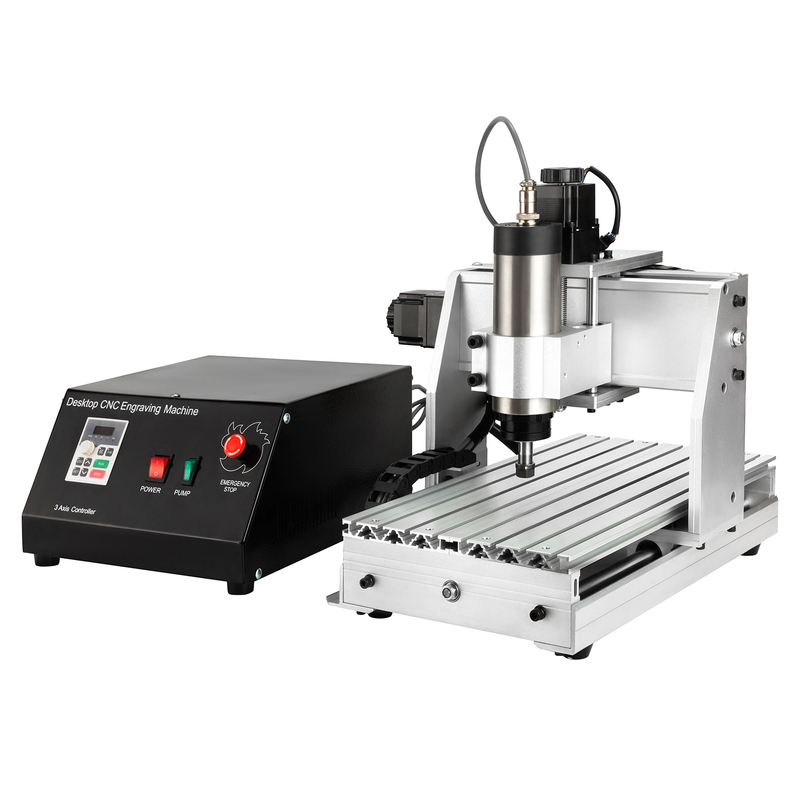
Huajiang offers two practicalMini CNC Routerchoices for users who need compact size, stable motion, plus enough spindle range for engraving, PCB work, prototyping, signs, and small craft production. The 3020 model fits tighter workspaces and lighter jobs, while the 3040 model gives more cutting area, stronger spindle choices, and better flexibility for small-batch output. Both follow the same idea: keep the machine small, keep operation simple, and give users a reliable way to move from digital design to finished parts.
Huajiang 3020 Mini Desktop CNC Router
TheHuajiang 3020 Mini Desktop CNC Routersuits buyers who want a compact starter machine for precise, smaller workpieces. Its200×300×60mm working areais enough for PCB boards, acrylic tags, small wooden parts, badges, nameplates, and fine engraving samples. It is a good match when space is limited, but accuracy still matters.
Specification
Huajiang 3020 Mini CNC Router
Working area
200×300×60mm
Spindle power
300W / 800W air-cooled spindle
Speed range
11,000–24,000 RPM
Axis
3-axis, optional 4-axis
Frame
Aluminum alloy frame
Software
MACH3 compatibility
The 3020 uses analuminum alloy frame, so it feels more stable than light plastic desktop machines. Its high rigidity helps reduce vibration during engraving, which is important for small text, PCB isolation, and clean acrylic edges. The air-cooled spindle keeps setup simple, so new users can focus more on toolpaths, bits, and material settings.
Best use cases: It works well for precision engraving, PCB routing, wood crafting, acrylic engraving, and light soft metal crafting. We would choose it for training labs, home studios, maker spaces, and starter shops. It is especially useful when projects stay small and users want an easy learning curve.
Huajiang 3040 Desktop Mini CNC Router
TheHuajiang 3040 Desktop Mini CNC Routergives more room for users who need larger parts or more detailed craft work. Its300×400×60mm working areasupports bigger acrylic panels, product prototypes, jewelry fixtures, small signs, and custom wooden items. It still fits desktop production, but it gives more breathing room during layout.
Specification
Huajiang 3040 Mini CNC Router
Working area
300×400×60mm
Spindle power
300W DC / 800W / 1500W air-cooled spindle
Max speed
24,000 RPM
Axis
3-axis, optional 4-axis rotary engraving
Precision
Positioning ±0.02mm, repeatability ±0.02mm
Control
MACH3 system, USB connection
The biggest advantage here is balance. The 3040 offers more spindle options, up to1500W, so it can handle deeper cuts and tougher craft materials more comfortably than smaller low-power units. Its±0.02mm positioning accuracy and repeatabilityhelp when making detailed prototypes, PCB-related parts, fine jewelry engraving, or repeat jobs for small business orders.
Best use cases: It fits prototyping, sign making, jewelry engraving, small-batch production, and complex craft work. It also makes sense for users who already know basic CNC operation and want a machine they can grow into. The optional 4-axis setup helps when rotary engraving becomes part of regular work.
3020 vs. 3040 Mini CNC Router: Which One Should You Choose?
Think about project size first, then spindle demand. If your work involves PCB boards, small nameplates, fine engraving, and light crafts, the 3020 keeps things simple and cost-effective. If you plan signs, prototypes, jewelry fixtures, larger acrylic pieces, or repeat production, the 3040 gives more space and stronger spindle flexibility.
Choose the 3020 if you need a compact beginner-friendly machine, your projects are small, and your focus is PCB, engraving, wood crafts, or acrylic tags. It is easier to place, easier to learn, and practical for light-duty daily work.
Choose the 3040 if you need a larger working area, more spindle power options, and better room for signs, prototypes, or small production batches. It gives users more room to experiment, especially when projects start moving beyond simple engraving.
FAQ
Q: What is a Mini CNC Router used for?
A: It is used for precision engraving, prototyping, crafting, sign making, PCB routing, wood carving, acrylic cutting, and small-batch production.
Q: Can a Mini CNC Router cut aluminum?
A: Yes. It can cut soft metals like aluminum, but it needs strong rigidity, proper bits, and careful feed settings.
Q: Is a Mini CNC Router good for PCB engraving?
A: Yes. It is suitable for PCB routing, fine engraving, and small circuit board prototyping.
Q: What spindle power is best for a Mini CNC Router?
A: 300W works for light engraving; 800W or 1500W suits harder materials.
Q: Is an air-cooled spindle enough for desktop CNC work?
A: Yes. It is simple, low-maintenance, and suitable for wood, plastics, acrylic, and PCB work.
Conclusion: Is a Mini CNC Router Right for You?
AMini CNC Routeris ideal for compact, precise, and flexible machining.
It supports precision engraving, prototyping, crafting, PCB routing, and small-batch production.
It also works with wood, acrylic, plastics, PCB boards, and soft metals.
Before choosing one, compare working area, spindle power, frame rigidity, software compatibility, and supplier support.
Pick the machine that matches your projects, materials, and future production needs.
Join us as an exclusive distributor of CNC Router Machines and CNC Spindle Motors. As a professional manufacturer, we provide high-performance machines, attractive profit margins, technical training, and full marketing support. Build a strong partnership with us and expand your market with confidence.


 English
 简体中文
简体中文 繁體中文
繁體中文 العربية
 Français
 Русский
 Español
 Português
 Deutsch
 italiano
 日本語
日本語 한국어
한국어 Nederlands
 Tiếng Việt
 ไทย
ไทย Polski
 Türkçe
 አማርኛ
አማርኛ ພາສາລາວ
 ភាសាខ្មែរ
 Bahasa Melayu
 ဗမာစာ
ဗမာစာ தமிழ்
தமிழ் Filipino
 Bahasa Indonesia
 magyar
 Română
 Čeština
 Монгол
 қазақ
қазақ Српски
 हिन्दी
 فارسی
فارسی Kiswahili
 Slovenčina
 Slovenščina
 Norsk
Norsk Svenska
 українська
 Ελληνικά
 Suomi
Suomi Հայերեն
 עברית
עברית Latine
 Dansk
Dansk اردو
اردو Shqip
Shqip বাংলা
বাংলা Hrvatski
 Afrikaans
 Gaeilge
 Eesti keel
 Māori
Māori සිංහල
සිංහල नेपाली
 Oʻzbekcha
 latviešu
 অসমীয়া
 Aymara
 Azərbaycan dili
 Bamanankan
 Euskara
 Беларуская мова
 भोजपुरी
 Bosanski
 Български
 Català
 Cebuano
 Corsu
Corsu ދިވެހި
 डोग्रिड ने दी
 Esperanto
 Eʋegbe
 Frysk
Frysk Galego
 ქართული
 guarani
 ગુજરાતી
 Kreyòl ayisyen
 Hausa
Hausa ʻŌlelo Hawaiʻi
 Hmoob
Hmoob íslenska
 Igbo
Igbo Ilocano
 Basa Jawa
 ಕನ್ನಡ
ಕನ್ನಡ Kinyarwanda
 गोंगेन हें नांव
 Krio we dɛn kɔl Krio
 Kurdî
Kurdî Kurdî
Kurdî Кыргызча
 Lingala
 Lietuvių
 Oluganda
 Lëtzebuergesch
 Македонски
 मैथिली
 Malagasy
 മലയാളം
 Malti
Malti मराठी
मराठी ꯃꯦꯇꯥꯏ (ꯃꯅꯤꯄꯨꯔꯤ) ꯴.
 Mizo tawng
 Chichewa
 ଓଡ଼ିଆ
ଓଡ଼ିଆ Afaan Oromoo
 پښتو
پښتو ਪੰਜਾਬੀ
 Runasimi
 Gagana Samoa
 संस्कृत
 Gaelo Albannach
 Sepeti
 Sesotho
 chiShona
 سنڌي
سنڌي Soomaali
 Basa Sunda
 Wikang Tagalog
 Тоҷикӣ
 Татарча
 తెలుగు
 ትግንያውያን
 Xitsonga
 Türkmençe
 संस्कृत
 ئۇيغۇرچە
 Cymraeg
 isiXhosa
 ייִדיש
 Yorùbá
 isiZulu