Views: 0 Author: Site Editor Publish Time: 2026-10-24 Origin: Site
A tiny lettering error can ruin an otherwise perfect CNC project. Machine size rarely causes it. The usual problems are the wrong bit, poor Z-zero, or unsuitable settings.
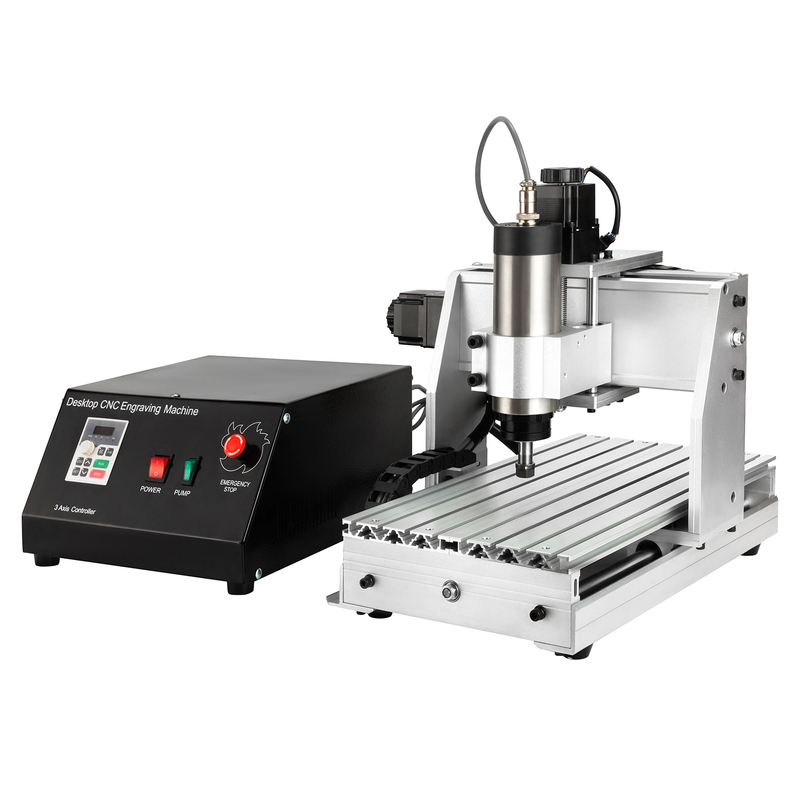
A Desktop CNC Engraving Machine can create signs, nameplates, PCB traces, gifts, and prototypes. However, each material needs a different cutting approach.
This guide explains engraving bits, material choices, depth control, and practical project ideas. You will also learn how to test settings before risking valuable stock.
How a Desktop CNC Engraving Machine Turns Designs Into Parts
Understand the Digital-to-Physical Workflow
A desktop CNC engraving machine follows coordinates rather than your hands. First, CAD software creates text, vectors, pockets, or three-dimensional shapes. CAM software then assigns a tool, cutting depth, feed rate, spindle speed, and toolpath. The controller reads the resulting G-code and moves the X, Y, and Z axes.
Simple engraving usually follows vector centerlines or closed V-carve regions. Cutting parts requires inside and outside profiles, tabs, and several depth passes. Relief work adds roughing and finishing toolpaths. Understanding those differences prevents a detailed engraving bit from becoming an unsuitable roughing tool.
Check the Machine Before Choosing a Project
The work area determines the largest part, but it does not guarantee performance. Z travel must fit the stock, spoilboard, tool length, and safe clearance. Spindle power, collet size, frame rigidity, drive system, controller, and software also shape the practical limits.
Huajiang began producing CNC engraving spindle motors in 2000 and later expanded into VFDs and engraving machines. Its Zhong Hua Jiang CNC engraving machine range now includes compact 1610 and 3018 models through larger desktop formats. That range illustrates why buyers should compare configurations, rather than relying on the model name alone.
Before the first cut, complete this short setup routine:
Inspect motion and tooling. Tighten the collet, then check each axis for free travel. Confirm the bit cannot strike clamps, screws, or travel limits.
Prepare a stable surface. Clean the bed and spoilboard before clamping flat stock. Even small debris can tilt a thin workpiece and change engraving depth.
Confirm the program. Match units, origin, tool number, spindle direction, and material thickness. Run an air pass above the surface before cutting.
Choose the smallest machine that comfortably fits repeat projects. Extra rigidity and spindle capacity matter when deeper cuts, larger tools, or soft metals enter the plan.
Choosing CNC Engraving Bits for Detail and Finish
Match the Cutter to the Toolpath
CNC engraving bits do different jobs. A V-bit creates sharp lettering and beveled grooves. Its cut widens as it moves deeper. Smaller angles reach narrow details, while larger angles produce broader strokes.
Solid-carbide cutters handle fine lines, serial numbers, and PCB isolation paths. Flat end mills cut pockets, slots, and flat floors. Ball-nose tools finish reliefs and curved surfaces. A spring-loaded diamond tool marks hard surfaces without a rotating spindle.
Bit type
Best use
Important control
30°–60° V-bit
Fine text, logos, narrow grooves
Surface flatness and shallow Z-depth
90° V-bit
Bold lettering, chamfers, signs
Depth controls final line width
Flat end mill
Pockets, profiles, slots, clearing
Chip load and pass depth
Ball-nose end mill
3D reliefs and smooth contours
Small stepover for a finer finish
Single-flute O-flute
Acrylic and many plastics
Strong chip evacuation reduces melting
Diamond drag bit
Surface marking on hard or coated materials
Spring pressure; spindle remains off
Consider Flute Direction and Tool Strength
Upcut tools clear chips efficiently, but they may lift wood fibers along the top edge. Downcut tools press fibers downward and protect the visible surface. However, chips can pack inside deep slots. Compression tools protect both faces once the cutting depth engages both flute directions.
Use the largest bit that still reaches every required detail. Larger diameters resist deflection and remove material faster. Tiny cutters need shallower passes, cautious feeds, and clean chip evacuation. They also break quickly after a plunge, collision, or poorly secured workpiece.
Build a Small, Useful Starter Set
A practical kit includes two V-bits and two flat end mills. Add an O-flute cutter for acrylic or a ball-nose tool for reliefs. Confirm shank size and usable flute length before programming.
This CNC Engraving Guide: Tools, Bits & Tips provides useful visual context for V-carving, rotary engraving, and diamond-drag marking. Still, begin every unfamiliar tool on scrap. Tool geometry, spindle runout, material batch, and machine rigidity can change the result.
Materials Guide for Desktop CNC Engraving
Wood, MDF, and Plywood
Grain direction can pull small details from wood. Dense hardwoods hold fine lettering better than soft, uneven stock. A V-bit suits decorative text. Downcut tools protect the top face, while compression tools help plywood stay clean.
MDF engraves consistently because it lacks grain. Use effective extraction and respiratory protection against its fine dust. Plywood quality varies by veneer, glue, and internal voids. Test the actual sheet first.
Acrylic and Other Plastics
Cast acrylic usually machines cleaner than soft plastics. Use a sharp O-flute tool, clear chips continuously, and prevent rubbing. Melting often signals poor chip evacuation, a dull tool, or unsuitable parameters.
Hard engineering plastics can hold detailed marks. Softer polyethylene may bend or smear. Secure thin sheets evenly without bowing their centers. Remove any film that could wrap around the cutter.
Material
Suitable starting tool
Common problem
First adjustment
Hardwood
V-bit or downcut end mill
Fuzzy grain
Sharpen the tool and change cutting direction
MDF
V-bit or flat end mill
Fine airborne dust
Improve extraction and reduce recutting
Plywood
Downcut or compression bit
Veneer tear-out
Test flute direction on scrap
Cast acrylic
Single-flute O-flute
Melting or welded chips
Improve chip clearing and prevent rubbing
PCB laminate
Fine engraving cutter
Uneven isolation width
Level the board and correct Z-zero
Aluminum or brass
Carbide end mill or engraver
Chatter, burrs, heat
Reduce engagement and improve rigidity
PCB and Soft-Metal Limits
PCB isolation milling needs a flat board because tiny Z changes alter trace width. Aluminum and brass demand rigidity, secure workholding, carbide tooling, and controlled chip removal. Treat them as shallow tasks unless the machine specifies more.
For example, the Zhong Hua Jiang 3020 desktop CNC router lists a 210 × 300 × 60 mm work area, ball screws, and several spindle choices. Its page includes wood, acrylic, PCB, aluminum, and brass. Buyers should still confirm the chosen configuration and validate material-specific settings before production.
Depth Control, Z-Zero, Feeds, and Safe Test Cuts
Make the Surface Predictable
Engraving depth begins before the spindle starts. Chips beneath the stock, a bowed board, or uneven clamp pressure changes the surface height. Clean the bed, surface the spoilboard when needed, and secure the workpiece without distortion. Thin PCB and acrylic sheets often need support across their full area.
Set Z-zero from the same reference used inside CAM. A touch probe improves repeatability when correctly calibrated. Paper or a feeler gauge also works, but use the same method consistently. Re-zero after changing a tool unless a verified tool-length system stores the offset.
Detailed Engraving Workflows – Bantam Tools explains why flat stock and accurate Z-height measurement matter. On larger or uneven surfaces, height mapping can compensate for small variations when the controller supports it.
Treat Depth, Feed, and Speed as One System
Pass depth describes vertical engagement during each cutting pass. Stepover describes sideways engagement between adjacent paths. Feed rate controls travel through material, while spindle speed controls rotations. These settings must produce chips rather than dust, rubbing, or uncontrolled loads.
There is no universal depth per pass. Start from the tool and machine recommendations, then reduce engagement for tiny bits, weak frames, long tool stick-out, or harder materials. Use several shallow passes whenever one deep pass causes deflection, chatter, heat, or missed steps.
Follow this controlled test sequence:
1. Create a small test pattern. Include lines, text, a pocket, and the narrowest planned detail. Use scrap from the same material batch.
2. Run an air pass. Keep the bit above the surface. Check the origin, extents, clamps, and retract height.
3. Cut conservatively. Watch chip formation and listen for changing spindle load. Pause immediately if chips pack around the tool.
4. Measure the result. Check groove width, actual depth, edge quality, and dimensions. Change one setting before repeating.
Uneven lettering usually points toward surface flatness or Z-zero. Chatter suggests weak workholding, excess tool stick-out, aggressive engagement, or insufficient rigidity. Burning wood and melted plastic often indicate rubbing or poor chip evacuation. Burrs on aluminum can signal a dull tool, unstable cutting, or unsuitable parameters.
Desktop CNC Engraving Project Ideas by Skill Level
Begin With Fast, Measurable Projects
Good beginner projects expose mistakes without wasting expensive stock. Start with a spoilboard grid, calibration square, nameplate, or key tag. These jobs teach origin placement, text sizing, V-bit depth, and workholding.
Advance to signs, coasters, inlays, PCB prototypes, control-panel labels, and small trays. Relief carvings add ball-nose finishing and stepover decisions. Repeated products introduce fixtures, consistent blanks, tool-life tracking, and documented settings.
Fixtures, repeatability, inspection, and cycle time
Choose Projects Before Choosing Machine Size
Write down the largest blank, deepest feature, smallest detail, material, and weekly quantity. Then compare usable work area, Z clearance, spindle power, collet options, controller, and duty expectations. Include the space required for clamps, dust collection, cables, and tool changes.
Zhong Hua Jiang lists compact 1610 and 3018 machines, then larger 3020, 3040, 6040, and 6090 formats. That progression suits different project envelopes, but a larger number does not automatically guarantee the right spindle or controller. Match the exact configuration to your recurring work.
Turn One Design Into a Reliable Process
Create a setup sheet after every successful job. Record the material supplier, stock thickness, tool, stick-out, spindle speed, feed rate, pass depth, stepover, origin, and finishing steps. Photograph the fixture and keep a labeled sample.
For repeat production, add locating pins, fences, or dedicated fixtures. Run a first-piece inspection before completing the batch. Check critical dimensions, spelling, alignment, contrast, and edge quality. Replace a cutter when finish quality changes, rather than compensating endlessly through software.
Never leave a desktop CNC engraving machine unattended. Keep hands away from moving tools, control dust, and use suitable eye, hearing, and respiratory protection. A small machine still produces sharp chips, rotating hazards, and airborne material.
Conclusion
A desktop CNC engraver performs best when four choices agree: bit, material, depth, and project. Start with rigid workholding, accurate Z-zero, conservative settings, and scrap tests.
Document successful parameters, then scale toward harder materials or repeated production. Careful matching delivers cleaner detail, longer tool life, and fewer ruined parts.
FAQs About Desktop CNC Engraving Machines
Q: Is a desktop CNC engraver the same as a CNC router?
A: The terms often overlap. Both use programmed axis movement and a rotating cutter. “Engraver” usually emphasizes fine lettering, marking, and shallow details. “Router” often suggests profiles, pockets, and deeper material removal. Actual capability depends on frame rigidity, spindle power, work area, controller, and tooling. Compare specifications instead of relying only on the product label.
Q: Which CNC engraving bit is best for small lettering?
A: A sharp, narrow-angle V-bit or solid-carbide engraving cutter usually suits small lettering. A 30-degree tool reaches finer details than a broad 90-degree V-bit. However, its tip is more fragile. Keep the stock flat, use shallow depth, and test the smallest text on scrap. Remember that deeper V-bit cuts create wider strokes.
Q: Can a desktop CNC engraving machine cut aluminum?
A: Some models can engrave or lightly machine aluminum. The machine needs adequate rigidity, a suitable spindle, carbide tooling, strong workholding, and effective chip control. Use conservative engagement and follow the machine and cutter recommendations. Entry-level engravers are not substitutes for rigid metal mills. Stop if chatter, heat, recutting chips, or spindle overload appears.
Q: How deep should each CNC engraving pass be?
A: No single pass depth works for every setup. Bit diameter, tip geometry, material, spindle power, rigidity, feed rate, and tool stick-out all matter. Begin from manufacturer guidance and make a shallow scrap test. Reduce engagement when the tool chatters, bends, overheats, or leaves a rough finish. Several controlled passes are safer than one aggressive cut.
Q: What are the best beginner CNC engraving projects?
A: Start with calibration shapes, a spoilboard grid, key tags, simple nameplates, and small wooden signs. These projects teach work origins, clamping, text layout, V-bit depth, and toolpath previews. Use inexpensive, flat stock and repeat one design after changing a single setting. Coasters, acrylic labels, and shallow inlays make useful next projects.
Join us as an exclusive distributor of CNC Router Machines and CNC Spindle Motors. As a professional manufacturer, we provide high-performance machines, attractive profit margins, technical training, and full marketing support. Build a strong partnership with us and expand your market with confidence.


 English
 简体中文
简体中文 繁體中文
繁體中文 العربية
 Français
 Русский
 Español
 Português
 Deutsch
 italiano
 日本語
日本語 한국어
한국어 Nederlands
 Tiếng Việt
 ไทย
ไทย Polski
 Türkçe
 አማርኛ
አማርኛ ພາສາລາວ
 ភាសាខ្មែរ
 Bahasa Melayu
 ဗမာစာ
ဗမာစာ தமிழ்
தமிழ் Filipino
 Bahasa Indonesia
 magyar
 Română
 Čeština
 Монгол
 қазақ
қазақ Српски
 हिन्दी
 فارسی
فارسی Kiswahili
 Slovenčina
 Slovenščina
 Norsk
Norsk Svenska
 українська
 Ελληνικά
 Suomi
Suomi Հայերեն
 עברית
עברית Latine
 Dansk
Dansk اردو
اردو Shqip
Shqip বাংলা
বাংলা Hrvatski
 Afrikaans
 Gaeilge
 Eesti keel
 Māori
Māori සිංහල
සිංහල नेपाली
 Oʻzbekcha
 latviešu
 অসমীয়া
 Aymara
 Azərbaycan dili
 Bamanankan
 Euskara
 Беларуская мова
 भोजपुरी
 Bosanski
 Български
 Català
 Cebuano
 Corsu
Corsu ދިވެހި
 डोग्रिड ने दी
 Esperanto
 Eʋegbe
 Frysk
Frysk Galego
 ქართული
 guarani
 ગુજરાતી
 Kreyòl ayisyen
 Hausa
Hausa ʻŌlelo Hawaiʻi
 Hmoob
Hmoob íslenska
 Igbo
Igbo Ilocano
 Basa Jawa
 ಕನ್ನಡ
ಕನ್ನಡ Kinyarwanda
 गोंगेन हें नांव
 Krio we dɛn kɔl Krio
 Kurdî
Kurdî Kurdî
Kurdî Кыргызча
 Lingala
 Lietuvių
 Oluganda
 Lëtzebuergesch
 Македонски
 मैथिली
 Malagasy
 മലയാളം
 Malti
Malti मराठी
मराठी ꯃꯦꯇꯥꯏ (ꯃꯅꯤꯄꯨꯔꯤ) ꯴.
 Mizo tawng
 Chichewa
 ଓଡ଼ିଆ
ଓଡ଼ିଆ Afaan Oromoo
 پښتو
پښتو ਪੰਜਾਬੀ
 Runasimi
 Gagana Samoa
 संस्कृत
 Gaelo Albannach
 Sepeti
 Sesotho
 chiShona
 سنڌي
سنڌي Soomaali
 Basa Sunda
 Wikang Tagalog
 Тоҷикӣ
 Татарча
 తెలుగు
 ትግንያውያን
 Xitsonga
 Türkmençe
 संस्कृत
 ئۇيغۇرچە
 Cymraeg
 isiXhosa
 ייִדיש
 Yorùbá
 isiZulu